What Is Compaction in AI?
You’re forty minutes into a conversation with your AI tool. You’ve been working through a problem — explaining context, iterating on solutions, building up a shared understanding of what you’re trying to accomplish. Then a message appears: “compacting conversation.”
The session continues. The AI still responds. But something shifted. It forgot that edge case you mentioned twenty minutes ago. It lost the thread on why you rejected the first approach. It’s asking questions you already answered.
What just happened is a process called compaction, and if you use AI tools for anything beyond casual one-off questions, you’re going to hit it eventually (if you haven’t already).
The full notebook
I keep physical notebooks. Have for years — Leuchtturm 1917s, filled with meeting notes, project sketches, half-formed ideas. When a notebook fills up, I go through it, rip out the pages that still matter, copy the important notes into a new one, and put the old notebook on the shelf.
That’s compaction.
The AI version works the same way, minus the shelf. When your conversation gets too long for the model to hold in its working memory — what’s called the context window — the system has to make room. It parses everything that’s happened, decides what matters most, structures it into a compressed summary, and starts a new context with that summary as the foundation. The old conversation is gone. The summary is all that remains.
Modern approaches sometimes keep the old conversation in an archival state, available for reference if you need to dig back. But accessing that archive costs tokens — the units that measure how much text the model processes — and that cost adds up fast. It’s expensive to go back to the old notebook, so most of the time, you don’t.
Why it happens
Every AI model has a context window — a hard limit on how much text it can process at once. Think of it as a desk. You can spread out papers, notes, reference documents, and working drafts, but the desk is only so big. Once it’s full, something has to come off before anything new goes on.
As of early 2026, the latest Claude models — Opus and Sonnet — hold up to 1,000,000 tokens. That’s roughly 750,000 words. OpenAI’s GPT-4.1 and GPT-5 models match that million-token capacity. Haiku, Claude’s fastest model, still caps at 200,000. Those numbers might sound like a lot, but they aren’t once you factor in the system instructions, the conversation history, any files or code the model is working with, and the model’s own responses. A complex agentic session can burn through hundreds of thousands of tokens before finishing a single task. Context windows got bigger. The work grew to fill them.
When the window fills up, the model just can’t… keep going. It has to compress, and the way it compresses determines what survives.
Three ways to shrink a conversation
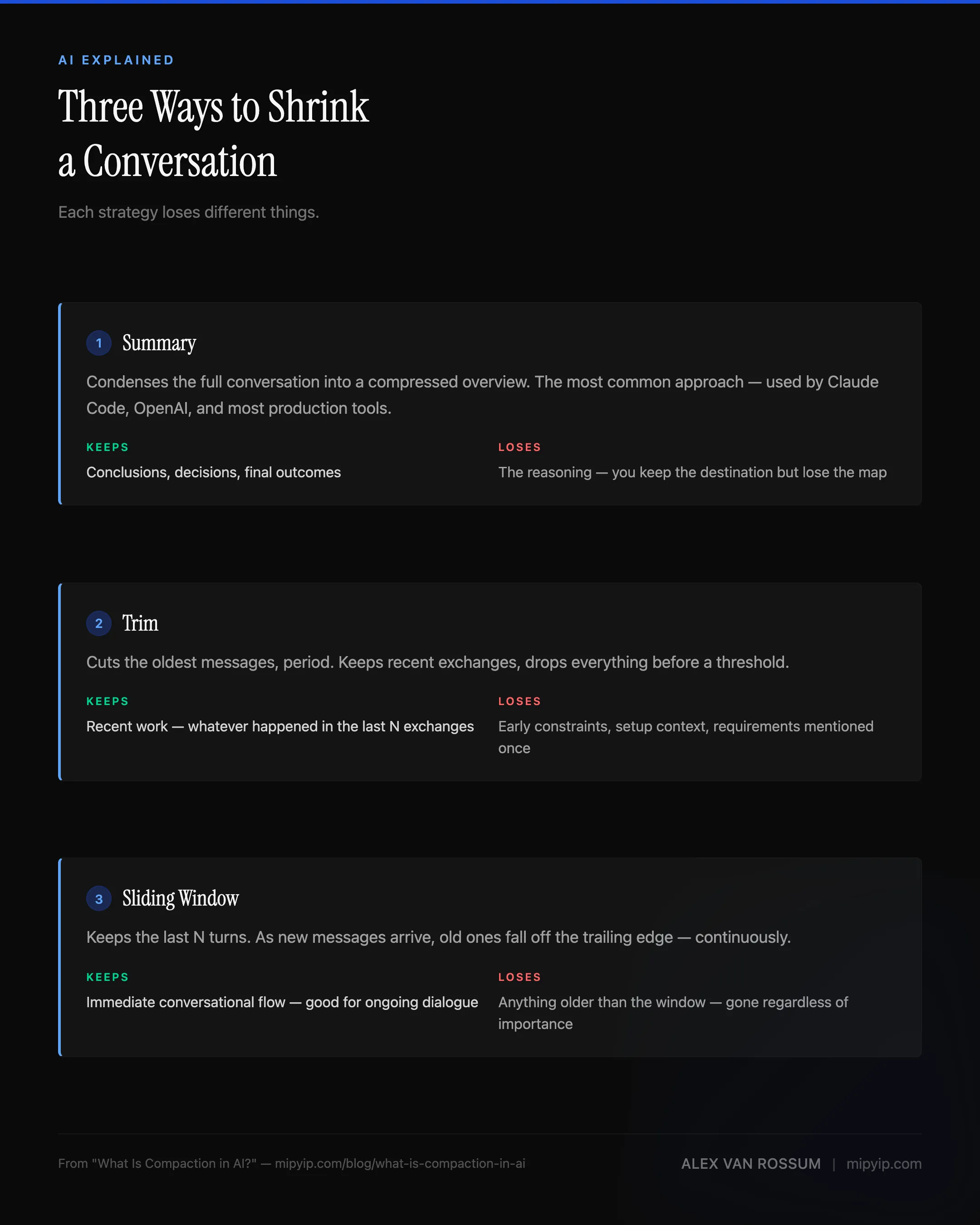
Not all compaction works the same way. The Microsoft Agent Framework documentation breaks it down into three broad strategies, and understanding the differences matters because each one loses different things.
Summary compaction is the most common approach. The system takes the full conversation, generates a condensed version — a summary of what was discussed, decided, and accomplished — and uses that summary as the new starting point. This preserves the conclusions well but tends to flatten the reasoning. You keep the destination but lose the map.
Trim compaction is blunter. The oldest messages get cut, period. The system keeps the most recent exchanges and drops everything before a certain point. This works when the early conversation was setup and the real work happened recently. It fails when something from the beginning — an important constraint, a requirement mentioned once and never repeated — suddenly becomes relevant again.
Sliding window keeps the last N turns of conversation and discards everything else. It’s a variant of trimming, but continuous — as new messages arrive, old ones fall off the trailing edge. Good for ongoing dialogue. Bad for any conversation where context from ten turns ago matters.
Most production tools use some hybrid. Claude Code leans toward summarization. OpenAI’s compaction produces an opaque, encrypted summary — you can’t even read what it preserved. The Inspect framework implements all three and lets developers choose.
What gets lost
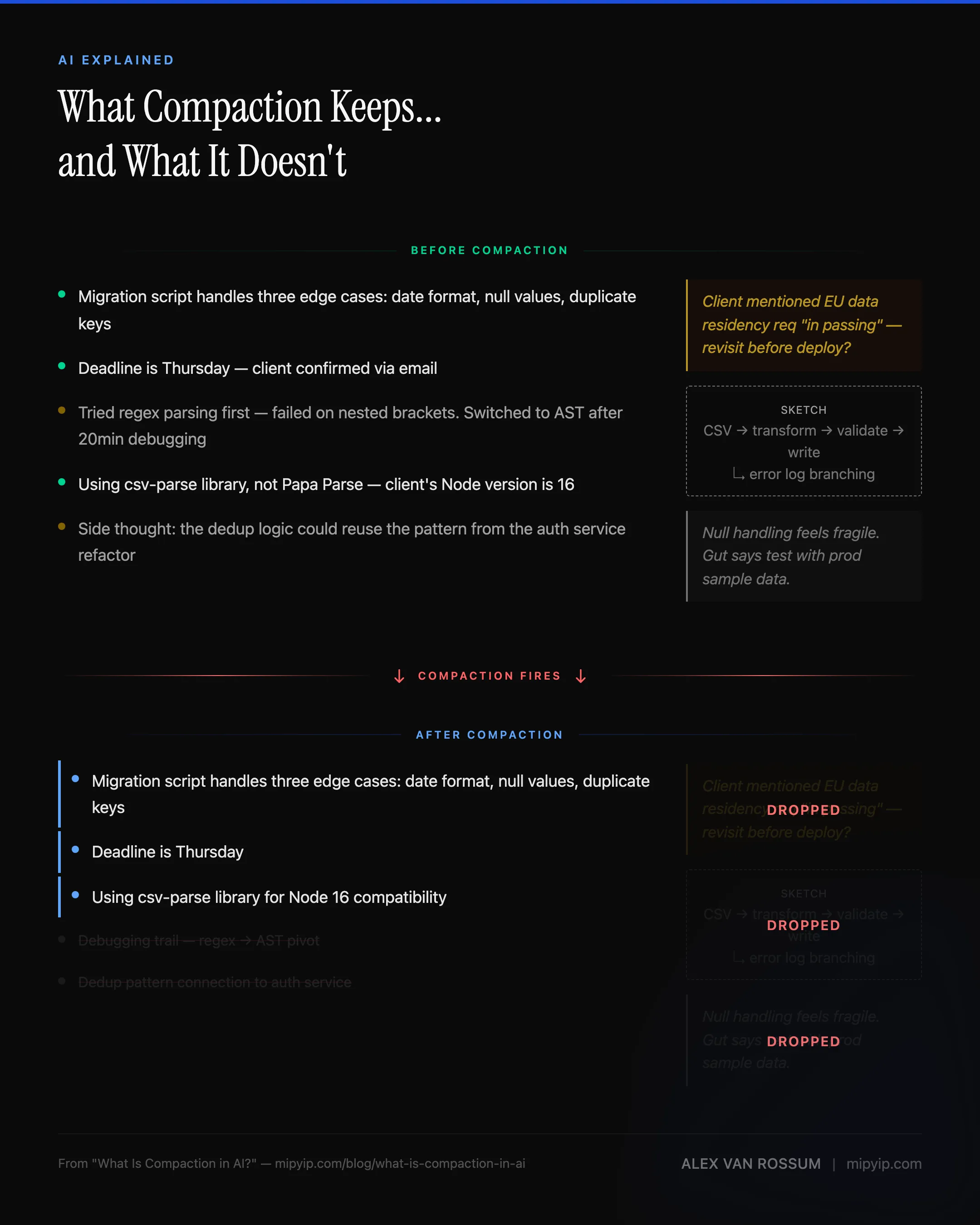
Regardless of which strategy fires, the outcome is the same — something gets lost. Broad strokes survive compaction reasonably well. “We’re building a migration script. It needs to handle three edge cases. The deadline is Thursday.” That kind of information compresses without much loss — it’s concrete, recent, and clearly important.
What doesn’t survive is texture.
Let’s go back to the notebook metaphor for a moment. When I copy notes into a new notebook, I keep the action items, the decisions, the key dates. What I lose are the margin notes — the tangential idea I jotted during a meeting that wasn’t directly relevant but connected to something else I was thinking about. The sketch that helped me visualize a relationship between two systems. The doodle. The stuff that doesn’t look important in isolation but was part of how I was thinking about the problem.
AI compaction loses the same things. The sub-context — the specific sequence of failed attempts that led to a working solution, the debugging observations that accumulated across dozens of exchanges or the casual aside where you mentioned a constraint that wasn’t directly relevant to the current task but would have been relevant to the next one. The system keeps the facts and drops the texture.
Ed Williams describes this well in the context of AI agents managing long conversations: the challenge isn’t just fitting information into a smaller space, it’s deciding what information matters before you know what questions are coming next.
Why this matters beyond developer tools
Compaction sounds like a technical implementation detail, but it really isn’t. It affects anyone who uses AI for sustained work — product managers iterating on a strategy document, writers developing a long piece across multiple sessions, team leads using AI to synthesize meeting notes and project status.
The costs are threefold:
Quality degrades silently. The AI doesn’t announce what it forgot. It doesn’t say “I lost the constraint you mentioned about the European market.” It just… proceeds without it. The output looks competent. The missing context makes it wrong in ways that aren’t obvious until later.
Token costs increase. Every time you re-explain context that was lost to compaction, you’re spending tokens — and money — on information the system already had. Jason Lew frames this pointedly: if you see compaction in your AI workflow, it should be a red flag, not a feature. You’re likely paying for the same work twice.
Trust erodes. Once you’ve experienced the AI forgetting something important, you start second-guessing every response. Did it remember the constraint? Is this recommendation based on the full picture or the compressed one? That uncertainty is corrosive.
What you can do about it
You can’t eliminate compaction — context windows are a physical constraint, like the size of your notebook. And just like a notebook, making it bigger has tradeoffs. You could carry a 700-page notebook, but flipping through it to find the one note you need takes longer, costs more, and the AI’s attention degrades the more it has to sift through. Bigger windows delay compaction — they don’t prevent it. So the better approach is working with the constraint instead of being surprised by it.
Keep sessions short and task-focused. If you operate with a task-forward mindset — one or two related tasks per session, then close and start fresh — you keep the context window well under capacity. You never hit compaction because you never fill the notebook. This is also just good practice for token efficiency: marathon sessions are expensive and fragile, while short, focused sessions are cheap and recoverable.
Persist important context outside the conversation. Governance documents, task logs, structured memory files — anything that matters beyond the current session should live in a file, not in the conversation history. When compaction fires, the conversation compresses, but the files on disk don’t. I use structured governance docs and a local RAG-based memory system specifically because they survive compaction by design. The context isn’t in the conversation — it’s in the project, where the AI can read it fresh every session.
If your tool supports manual compaction, use it. In my testing, Claude Code auto-compacts at roughly 83% context usage. If you trigger compaction yourself before that threshold, you choose what gets preserved — because you’ve already saved the important context to your governance documents before the compression happens. You’re ripping out the notebook pages yourself instead of letting someone else decide which ones matter.
None of this requires specialized tooling. A well-organized project folder and a habit of documenting decisions as you go accomplishes the same thing. The principle is simple: don’t trust the conversation to remember for you. Write it down somewhere that won’t get compressed.
For the deep dive on how auto-compaction specifically affects Claude Code sessions: Auto-Compaction Is Costing You Sessions. For the governance documents that survive compaction by design: The Governance Documents. For how retrieval architecture solves the broader memory problem: Every Management Failure Is a Retrieval Failure.
Sources: Microsoft Agent Framework: Compaction (strategies: summary, trim, sliding window; cost and latency motivations) · OpenAI Compaction Guide (provider-level compaction API with opaque encrypted summaries) · Anthropic — Claude Models Overview (current context window sizes: 1M tokens for Opus/Sonnet, 200K for Haiku) · Inspect: Compaction (native, summary, and trim implementation approaches) · Ed Williams — How Modern AI Agents Manage Context (practical agent conversation management) · JXNL — Context Engineering: Compaction (conceptual depth on why compaction matters for agent behavior)
Or get new posts in your inbox
Occasional writing on systems, ADHD, and AI. No cadence pressure.
You're in. I'll send you the next one.