Your project's institutional memory, searchable by meaning.
pmem gives Claude Code persistent, semantic memory across sessions. It indexes your project's documentation, decisions, and history into a local vector database — then exposes it via MCP tools. No external APIs. No data leaves your machine.
Free forever · Python 3.11+ · Requires Ollama
Query
"Which posts are related to governance?"
grep
~90s · ~24K tokens
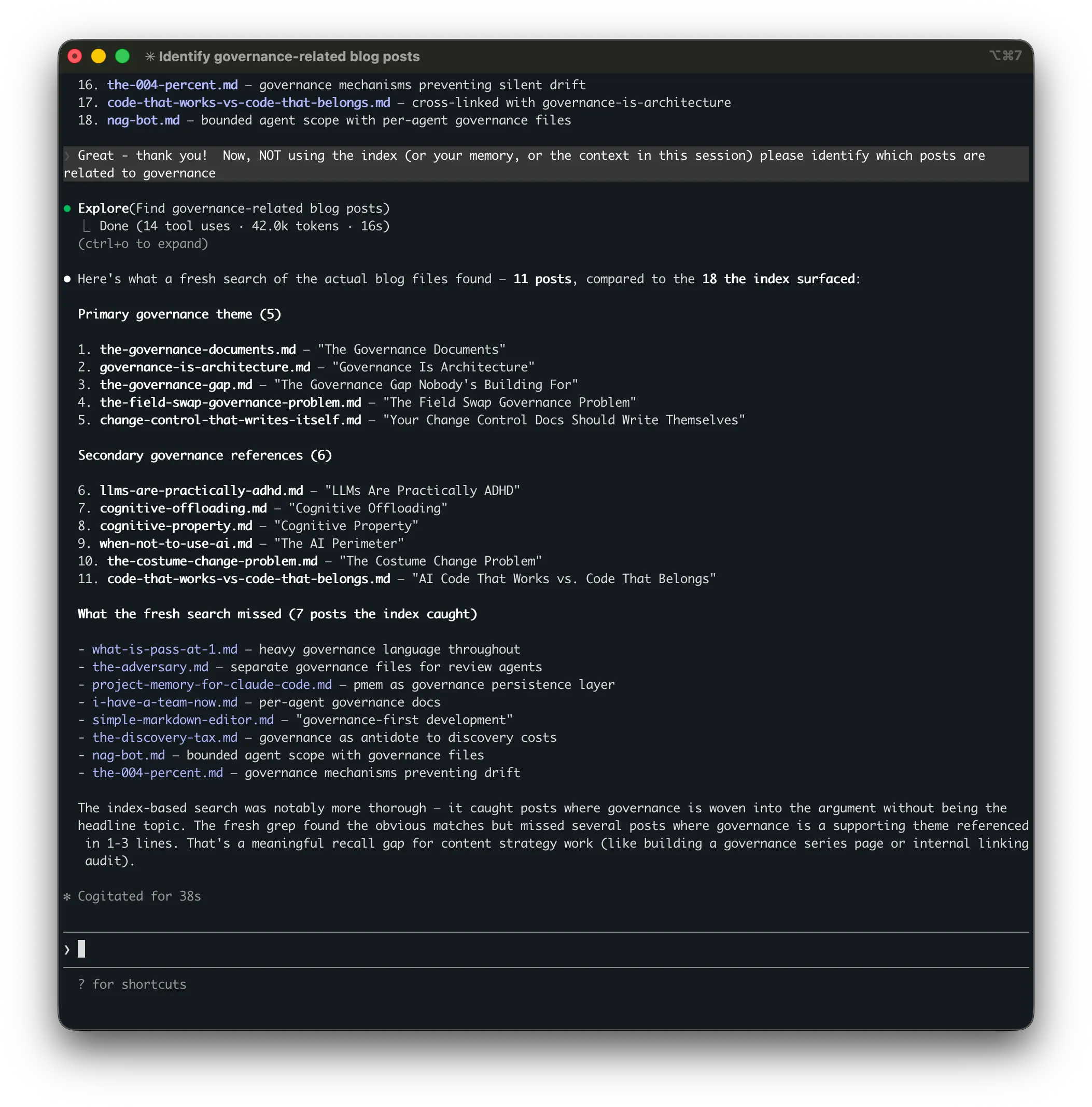
Found 11 posts
Missed 7 · ~4× the token cost
pmem
~20s · ~5.5K tokens
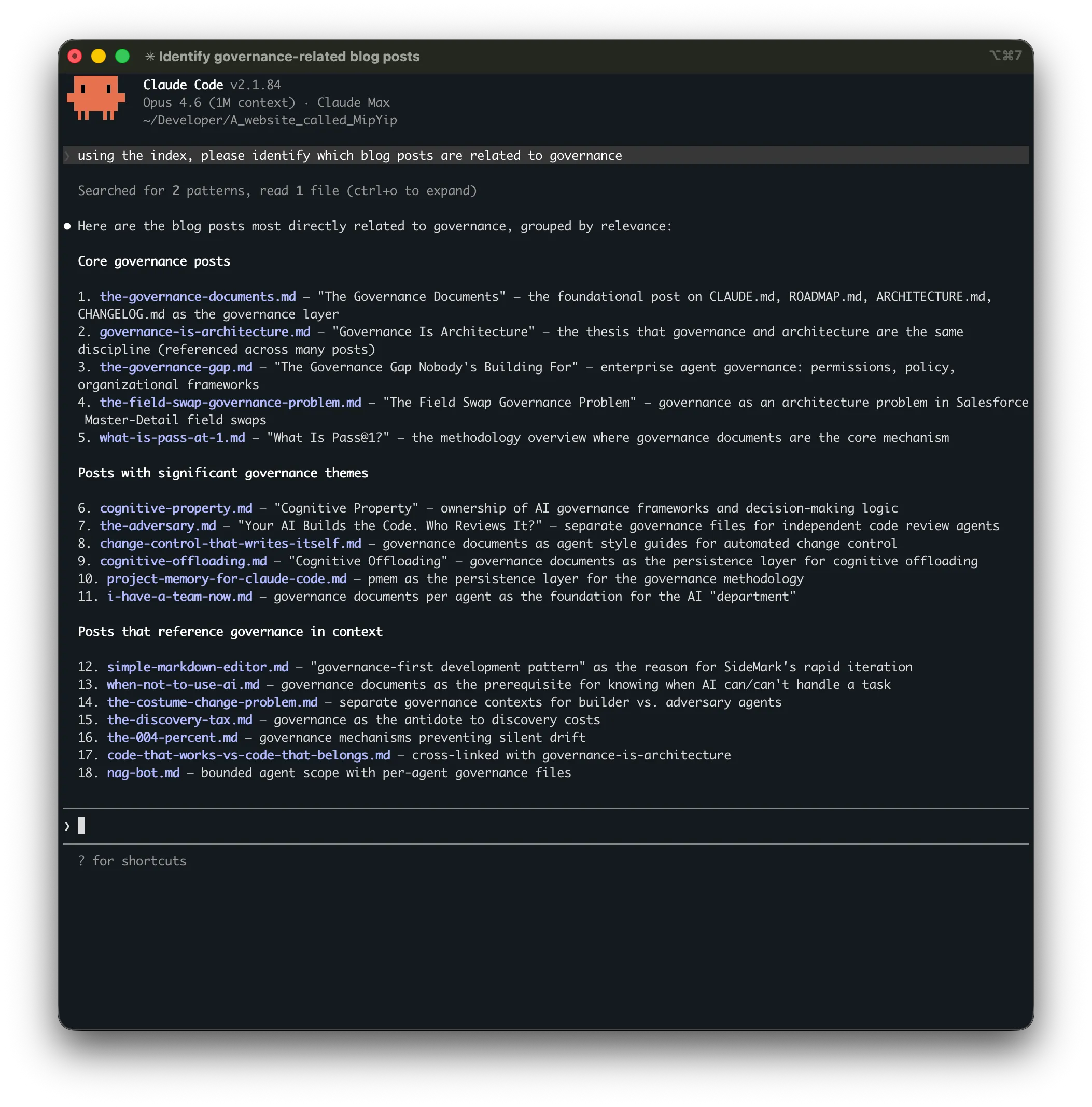
Found 18 posts
Grouped by relevance: core → thematic → contextual
The Problem
Your agent's memory has a ceiling.
Claude Code isn't completely amnesiac — it has session memory, it reads CLAUDE.md, and with the right governance documents it can recover a lot of context at session start. For smaller projects, that's enough. But as projects grow past a few dozen files, the gap between what the agent can reasonably read at startup and what the project actually knows gets wider every week.
So you grep. You tell the agent to search for something you vaguely remember writing down. It reads files, scans for keywords, and sometimes finds what you need. More often, it doesn't — because grep matches text, not meaning. And every file the agent reads to search for context is tokens spent on retrieval instead of actual work.
Not Session Memory
Different problem, different tool.
Most Claude Code memory tools solve session continuity: what did Claude do last time? They capture actions, compress conversation history, and replay it into future sessions.
pmem solves a different problem: what does the project know? Architecture decisions, task logs, lessons learned, archived roadmaps — institutional knowledge that exists in files, not in session transcripts. When you ask "why did we choose this auth approach?" the answer isn't in what Claude did yesterday. It's in an ADR you wrote three months ago.
| Session memory tools | pmem | |
|---|---|---|
| Remembers | What Claude did | What the project documented |
| Source data | Session transcripts, tool usage | Markdown, text, code files in your repo |
| Search method | Keyword / hybrid over sessions | Semantic (vector) search over project docs |
| Requires | Cloud API or session capture hooks | Local only — Ollama + ChromaDB, no API keys |
| Use case | "Continue where we left off" | "What did we decide about X six months ago?" |
pmem doesn't replace session memory. It fills the gap that session memory can't: retrieving decisions, context, and rationale from your project's documentation by meaning, not by keyword.
How It Works
Question in, answer out, sources cited.
1. Index
pmem index walks your project's markdown and text files. Header-aware chunking keeps semantic units intact — a section stays with its heading. Embeddings are generated locally via Ollama.
2. Query
Claude Code calls memory_query with a natural language question. pmem finds semantically similar chunks and returns them with source paths and relevance scores.
3. Stay current
Incremental indexing re-embeds only changed files (SHA-256 hash comparison). The /welcome and /sleep skills keep the index fresh as a side effect of your session workflow.
Grep vs. Semantic Search
Your questions don't match your answers.
You search for "why did we choose the vector database?" Your notes say "ChromaDB's file-based persistence was simpler for our use case." Grep returns nothing. pmem returns the exact paragraph.
grep
$ grep -r "chose vector database" No results.
Matches exact text. Misses meaning.
pmem
memory_query: "why did we choose the vector database?" → ARCHITECTURE.md § Key Design Decisions
"ChromaDB's file-based persistence was simpler for our use case and LanceDB was shelved."
Same Query, Real Results
"Identify governance-related blog posts"
Both approaches searched the same project — over 500 markdown files. The index-based search found 18 posts in ~20 seconds using ~5,500 tokens. The fresh search found 11 in ~90 seconds using ~24,000 tokens — roughly 4× the cost for 7 fewer results. The posts it missed were the ones where governance was a supporting theme rather than the headline topic.
Four MCP Tools
Four core tools. Minimal overhead.
memory_query
Natural language question → semantic retrieval → optional LLM synthesis → answer with source citations.
memory_search
Raw semantic search. Returns chunks with relevance scores for when you want the raw data, not a synthesized answer.
memory_status
Index health at a glance: file count, chunk count, staleness, model info. The agent checks this at session start.
memory_reindex
Trigger a manual reindex. Accepts force: true to rebuild the entire index from scratch.
Under the Hood
Intentionally lightweight.
No LangChain. No LlamaIndex. About 2,000 lines of Python. The RAG pipeline is embed → store → search → synthesize. Four operations don't need a framework.
Embeddings
nomic-embed-text
Via Ollama · 768D · ~274MB · No GPU required
Vector Store
ChromaDB
File-based · No server · Persistent · Real vector search
Chunking
Header-aware
Markdown headers as split points · Size fallback · Heading metadata preserved
Indexing
Incremental
SHA-256 hash comparison · Only re-embeds changed files
LLM Synthesis
Optional
Any OpenAI-compatible endpoint · LM Studio · Ollama · Fully local
Integration
MCP Protocol
4 tools · 3 skills · Native Claude Code integration
Quick Start
Two minutes. No cloud accounts.
Prerequisites
# Python 3.11+ and Ollama required ollama pull nomic-embed-text Install & Initialize
pip install pmem-project-memory cd ~/your-project pmem init pmem index Session Skills
pmem install-skills # Adds /welcome, /sleep, and /reindex to Claude Code
Register the MCP server in ~/.claude.json (global) or .mcp.json (per-project). Full instructions in the README.
Session Workflow
Memory maintenance as a side effect of working.
The index stays current because maintaining it is built into the session workflow — not a separate chore. Three skills handle the lifecycle.
/welcome
Session start. Reads governance documents, refreshes the memory index, checks status, confirms readiness. The agent starts every session with full context.
/sleep
Session end. Updates governance documents with what happened. Captures changes to the memory index. Context moves from the conversation to files — nothing is lost.
/reindex
Mid-session refresh. When you've updated files during a session and the agent needs to search the latest state. Fast — only re-embeds changed files.
Or skip the skills entirely: pmem watch
Runs in the background and polls for file changes every 5 seconds. The index stays current automatically — no slash commands needed. Useful if you want always-fresh memory without building it into your session ritual.
Give your Claude Code agent a memory.
Free, open source, MIT licensed. Two minutes to set up. No data leaves your machine.
FAQ
Common questions.
Does pmem work with projects that aren't markdown-heavy?
By default, pmem indexes .md and .txt files. But you can add any file type with pmem include "**/*.py" — size-based chunking works well enough for most languages. Language-aware chunking that understands functions, classes, and docstrings is planned for Phase 3.
How much disk space does the index use?
Minimal. A project with 300 markdown files generates an index under 50MB. ChromaDB stores vectors efficiently. The Ollama embedding model (nomic-embed-text) is ~274MB and shared across all projects.
Can I use a different embedding model?
Yes. Configure the model in .memory/config.json or globally at ~/.config/pmem/config.json. Any Ollama-compatible embedding model works. nomic-embed-text is the default because it balances quality and speed well for documentation.
Does it work with other AI coding tools?
pmem exposes its tools via MCP (Model Context Protocol). Any tool that supports MCP can use it. The session skills (/welcome, /sleep) are Claude Code slash commands, but the MCP tools are tool-agnostic.
What about Windows and Linux?
pmem is Python and runs anywhere Ollama runs. macOS, Linux, and Windows (via WSL or native) are all supported. The only platform-specific part is Ollama itself, which has installers for all three.