You're running a dozen Claude Code sessions. Which one is waiting on you?
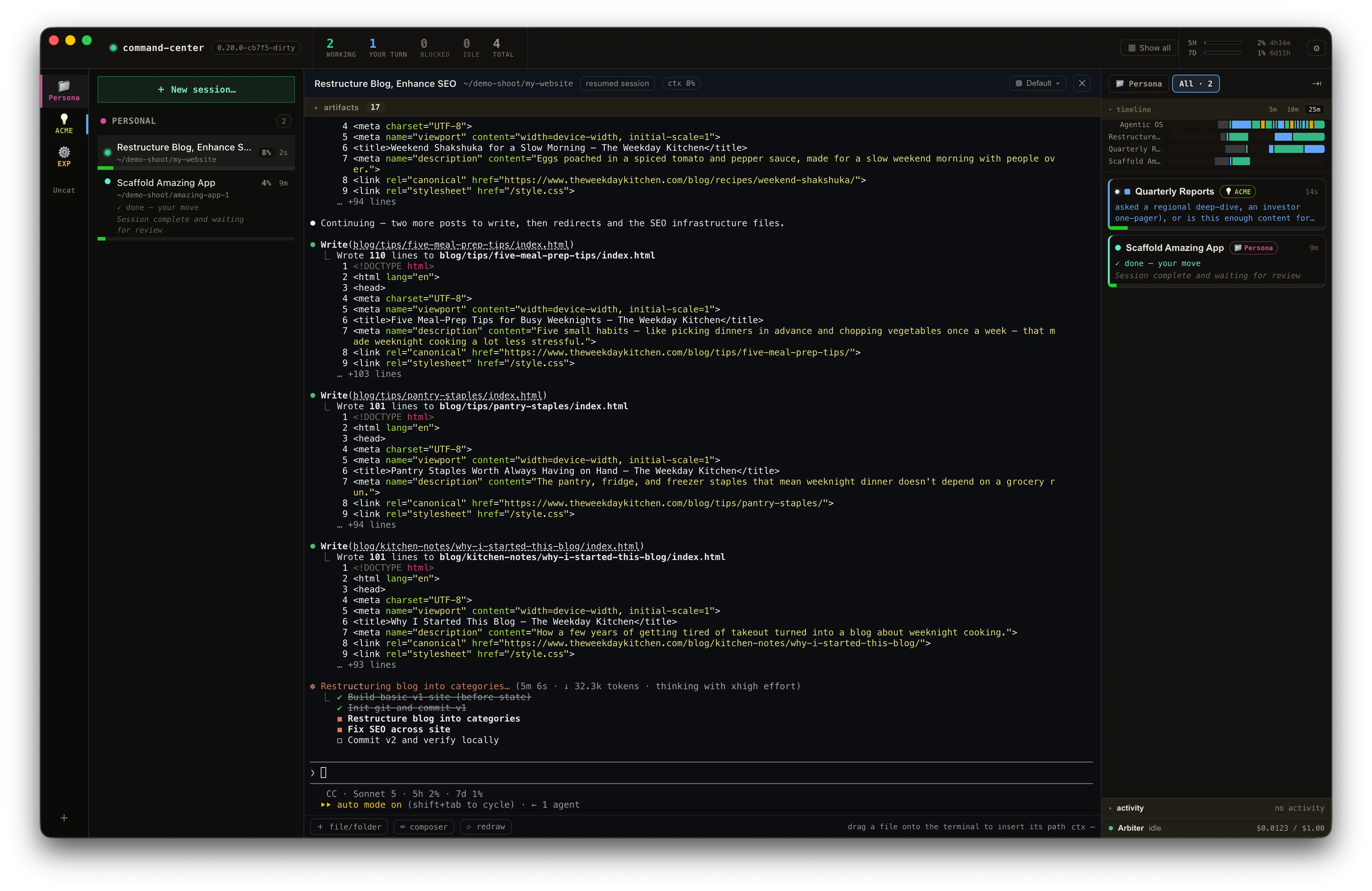
CC Command Center is a macOS desktop app that hosts and orchestrates many Claude Code CLI sessions at once, each in a real terminal. It shows what every session is doing, how sessions relate to each other, and which ones are waiting on you — and it keeps that state across restarts, so what's out of sight doesn't become gone.
Built entirely with Claude Code, for Claude Code.
Why It Exists
The terminal soup problem.
Running agent sessions one at a time is fine. Running fifteen of them across personal projects, your own business, and three clients is a different job entirely, and the part that breaks first is your memory of what each one was doing. A session asked you a question forty minutes ago and you never went back. Another finished overnight and you found out two days later. A third has been sitting on a permission dialog since lunch, looking — from the outside — exactly like a session that's hard at work.
Fourteen windows. Alt-tab. Read scrollback. Guess. Alt-tab again. Half the time I'd forget why I opened the last one on the way to the next, and I was spending more attention locating the work than doing it.
Everything in this app exists to answer one question in about a second, which of these is waiting on me and where, and to hold that answer somewhere other than my memory.
Awareness
Every waiting session tells you what it wants.
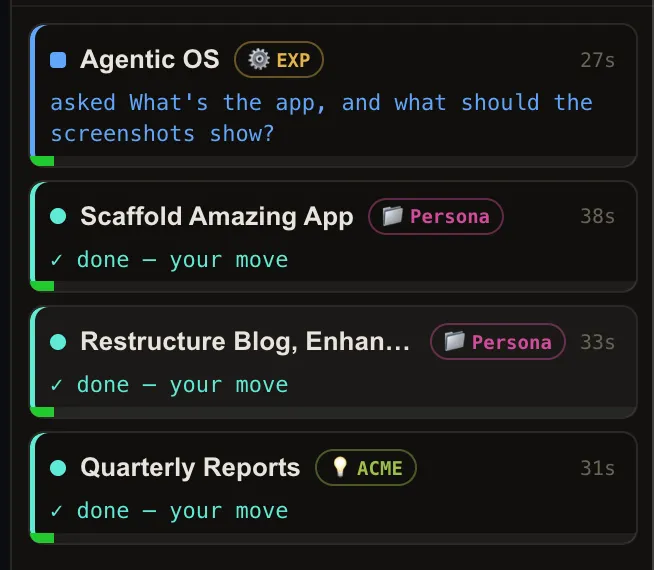
Four sessions, four reasons, no clicking required.
One honest status per session
Sessions report their own state through Claude Code hooks, which the app fuses with a transcript reader, a live scan of the terminal buffer, and the edge graph into one signal per session: working, your turn, needs approval, blocked, done, or idle. Most-urgent-wins, stale signals age out, and nothing is installed inside the session to produce any of it.
Read the reason without opening the session
Every needs-you row carries the substance of the ask: the exact command awaiting a permission, the actual question the assistant ended on, or the name of the child a parent is blocked on. You triage from the row itself.
Remember what you've already handled
A ledger tracks every gate a session raises and survives a restart, so a moment that needed you is still there — dimmed and resumable — after you quit and relaunch. Nothing you haven't looked at quietly disappears.
Get told when unattended work finishes
A session is flagged done only when it actually completed while you weren't watching it, so the session you're currently reading won't nag you about its own completions.
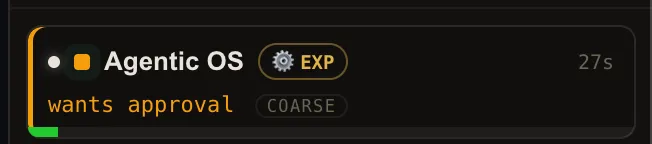
A session stuck on a permission dialog looks busy
In the transcript, a session frozen on an approval reads as working, which is how one sits untouched for an hour while you assume it's fine. The app scans the terminal's raw buffer for the dialog's signature instead, so an approval it can't clear itself surfaces amber and clears the instant you answer.
The Fleet
One keystroke shows you everything at once.
The overview grid renders every active session as a live terminal thumbnail outlined in its state color, sorted so the sessions that most need you land top-left. Outline color and tile position ride the same 1.5-second snapshot the rest of the app does, so the color stays trustworthy even though the picture is cheap.
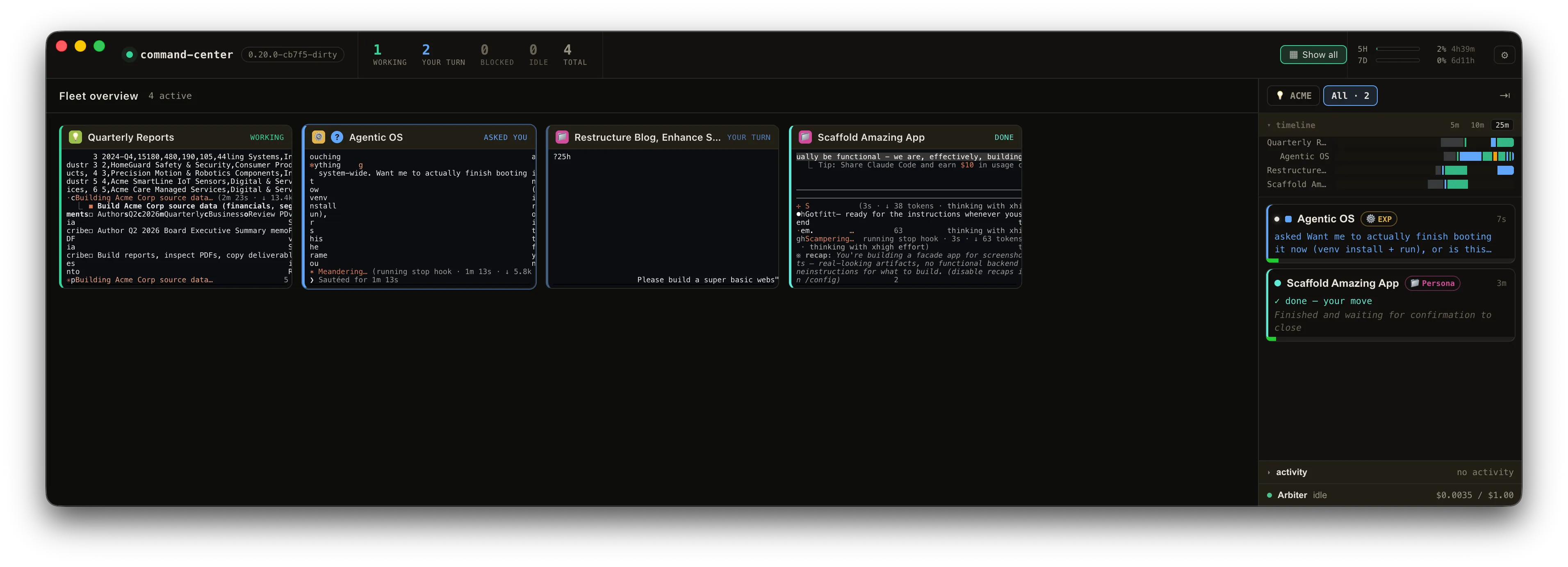
Click a tile to dive in
Clicking a session opens that live terminal, switches to its category, and highlights its row, which makes the overview a way in rather than a dashboard you look at and leave.
The beacon bar
A live status board across the top counting the fleet by state and listing what needs you, each item clickable, no matter which category you happen to be looking at. Sessions that are just working stay quiet.
Hard-separated categories
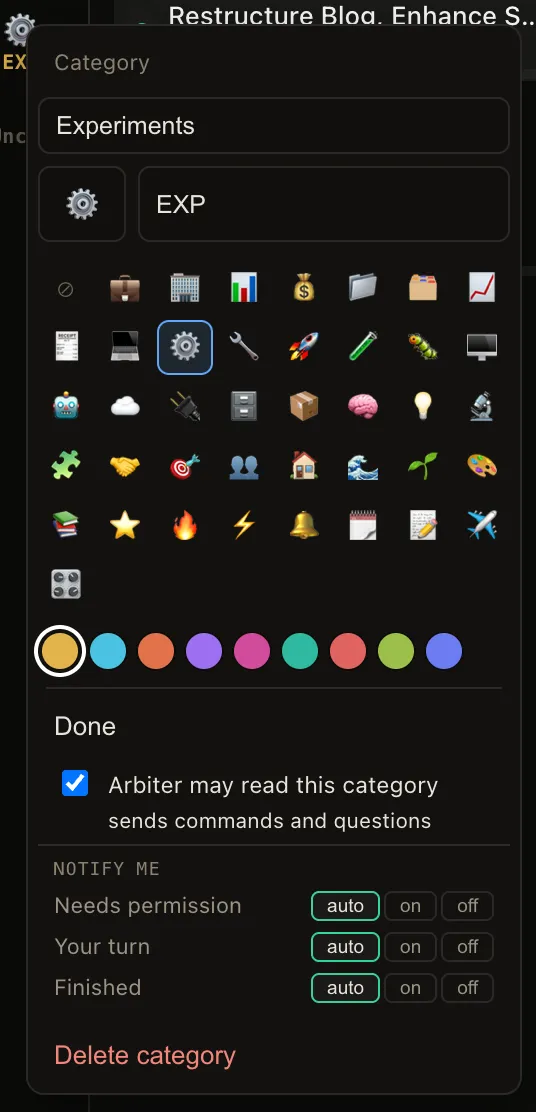
Sessions live in categories — personal, business, a specific client — each with its own color, emoji, and label, so client work never bleeds into personal.
Keep separate work separate
Drag a cell to reorder the rail into whatever shape your week actually has. A blocking child inherits its parent's category, so a subtree of work can't drift across the boundary between two different clients. Notifications are per-category too: any class can be overridden where it matters and inherit the global setting everywhere else, so personal work stays quiet while a client category is loud.
Sessions
It adopts what you already have running.
The app scans your Claude Code sessions every couple of seconds and confirms each one is a genuinely live process, matching command and start time so a recycled PID can't impersonate a session that already died. Sessions you started in any terminal show up here and become manageable without relaunching them.
Launch a new session from one dialog
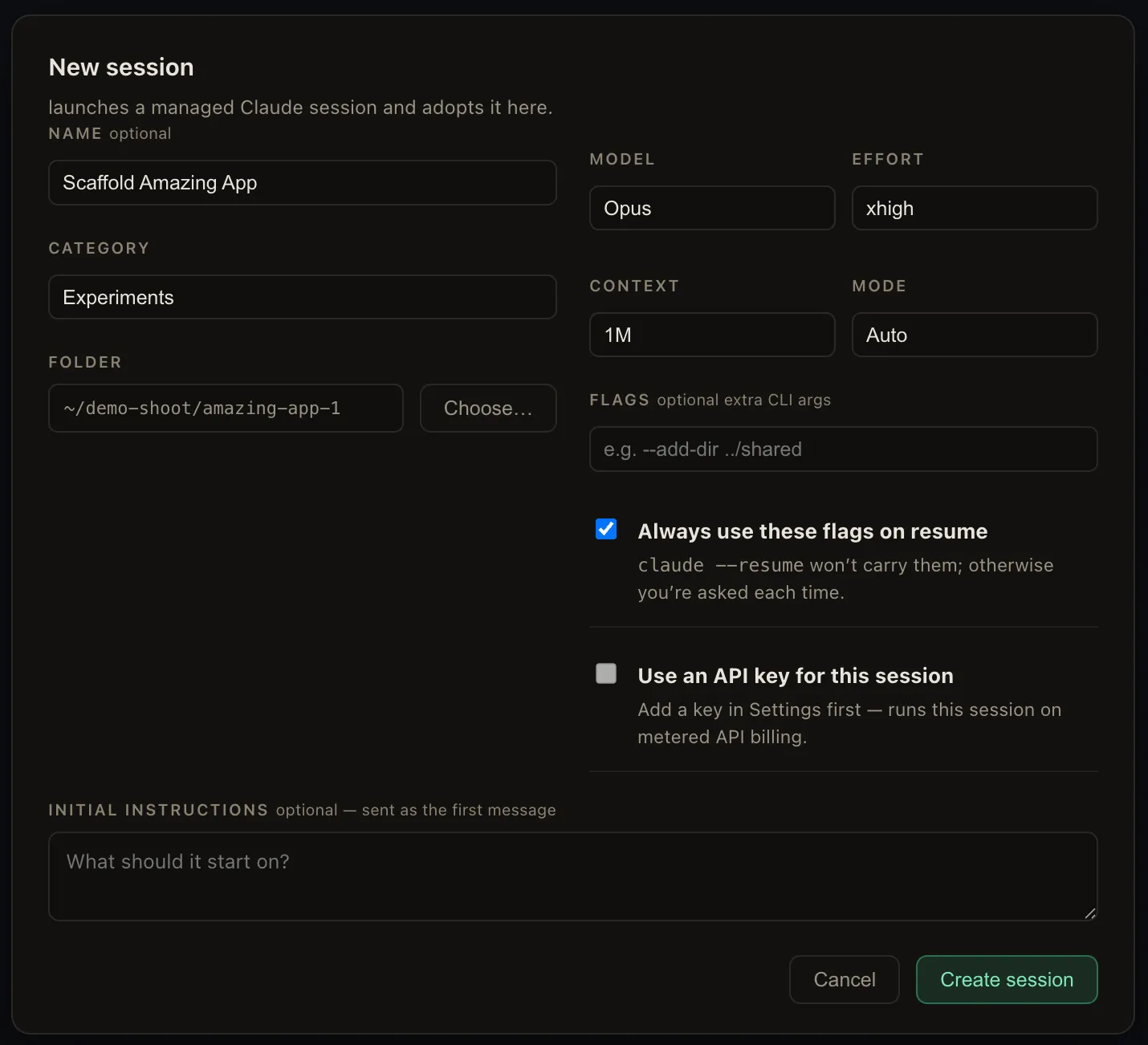
Name, category, folder, model, effort level, permission mode, an optional API key, and an initial instruction, all in one step — so the session starts on your task instead of sitting at an empty prompt.
Pick the model and effort you want
Effort from low through max, plus an ultracode mode for heavy orchestration work. Settings that would do nothing on the chosen model are hidden, so the UI never offers a knob with no effect.
Reopen where you left off
Model, effort, context size, and permission mode are stored per session and rebuilt into the command on resume, which the CLI doesn't carry forward on its own. A resumed session repaints its prior conversation immediately.
Coordination
A subagent you can actually talk to.
This is the feature the whole app grew out of. You're deep in a project and you hit something that needs solving but isn't the thing you're doing. Today you get three options, and all of them cost you something.
- 01 Chase it inside the current session, which muddies the context you were holding and, more expensively, the one you were holding.
- 02 Open another terminal, start a session, retype enough context to make it useful, and now you're managing windows and remembering which one is waiting on you.
- 03 Ask the session to note it for later and hope later arrives.
A subagent gets close, but you can't talk to one. It runs, it reports back, and you're not in the conversation. This app exists because I wanted that missing move: spawn a child session on a specific task, hand it context from the session you're already in, and then go work with it directly. The first tagged release couldn't spawn a child at all, but it already carried the data model for one, typed blocking-versus-tangential edges sitting in the registry with nothing able to create them yet. The spawn itself arrived a day later.
Right-click, spawn a child, open the link, and ask the parent to brief it. If the work is blocking, the parent shows blocked until the child is done. If it can run alongside, both stay live and tell each other when they finish. If it's a genuine tangent, spin it off with context and come back to it whenever. The tree and the mailbox exist to make that one move work.
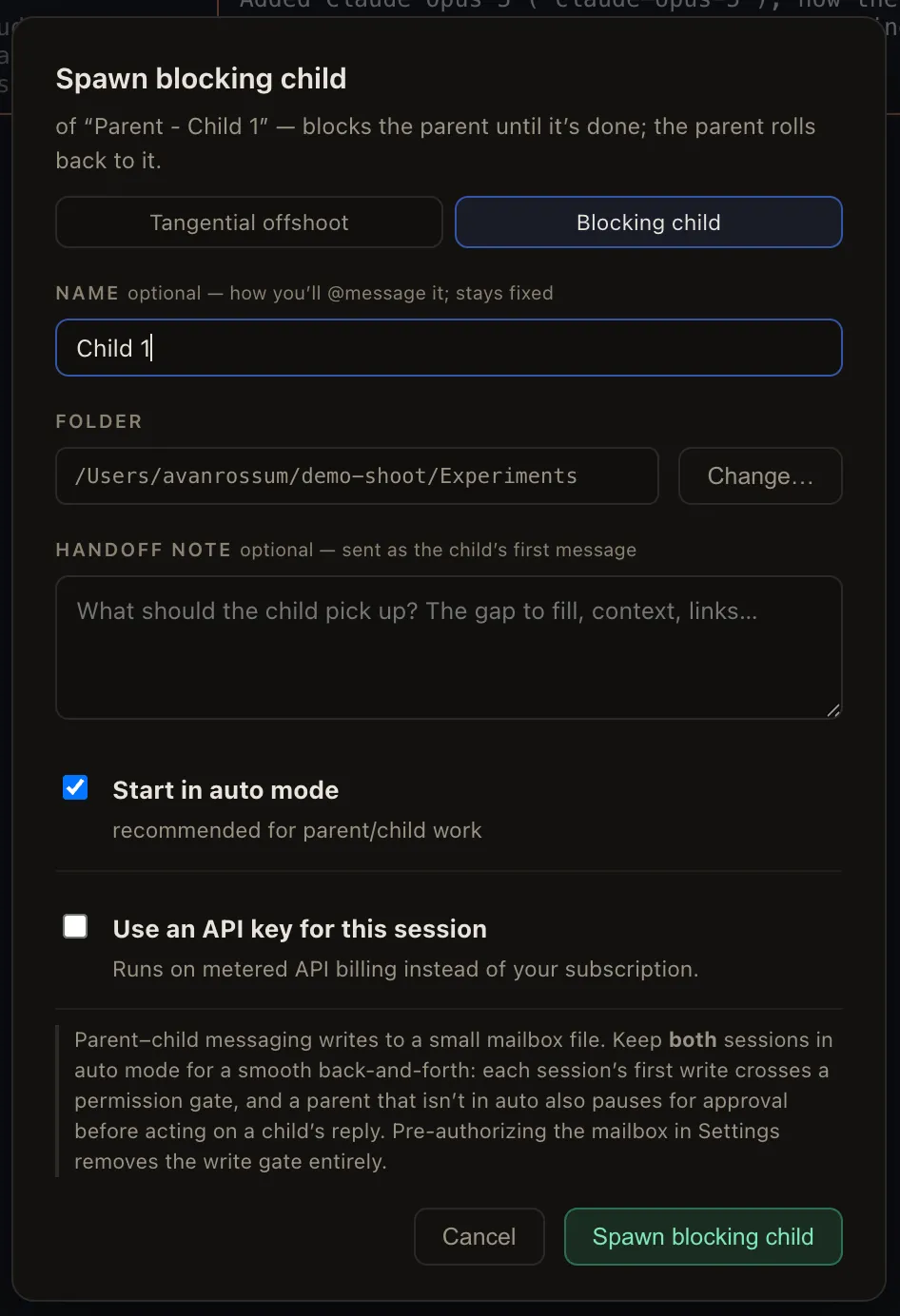
Spawning a blocking child, with the note it should start from.
A message bus with nothing installed inside the session
App-spawned sessions get a filesystem outbox and a one-time preamble teaching them to write there. The app drains each outbox every scan and routes each message to the session it's addressed to — a parent, a named child, or any other session you've connected them to. No skill, no MCP server, no extra dependency in either session.
Default deny, and you hold the grants
A pair can message only along a link you opened, or the parent–child edge you created by spawning it. A session can never open a link for itself or ask for one. Grants are directional and revocable, and permission is re-checked at the moment of delivery, so revoking a pair stops mail already in flight. An address a session may not reach fails uniformly, revealing nothing about whether that session exists.
It waits for your half-typed sentence
A message is injected only when the target is affirmatively free and has no unsent text sitting in its input box. Delivery is a bracketed paste plus a submit, so pasting into a half-written prompt would send your draft along with it — the app tracks unsent input from the keystrokes themselves and waits.
Nothing is lost, and nothing is silent
Every message becomes a database row the instant its payload is claimed off disk, before routing is attempted, so there's never a moment when an in-flight message has no durable copy. Bodies are stored whole. Undelivered payloads also stay on disk under ~/.claude/ccc/mail/spool, recoverable by hand. A message that can't be delivered still exists, in full, with the reason it's stuck — and survives a restart.
Delivered isn't the same as read
Delivery proves only that text reached the input. A recipient acknowledges by writing ACK <id>, and failing that the app corroborates from the recipient's own hook activity. Acknowledged and inferred are shown distinctly, and an uncorroborated delivery is never auto-failed, because a false failure sends you chasing a message that landed.
Addresses that survive a rename
Each session gets an immutable alias minted at adoption, so an address keeps resolving after Claude's auto-title drifts. Sessions can ask instead of guessing: ?WHO lists the sessions they're permitted to reach, ?INBOX reports what's waiting, ?WHOIS validates one address. @user reaches your own inbox and is injected into no session.
A pause that survives a restart
One switch freezes all messaging and stays frozen across a relaunch. Behind it sit a per-pair rate cap, a per-session outbound cap that bounds a fan-out star the pair key can't see, and a fleet-wide breaker that trips the pause rather than dropping messages. Removing a session archives its mail for a retention window you set, revoking its grants at the same time.
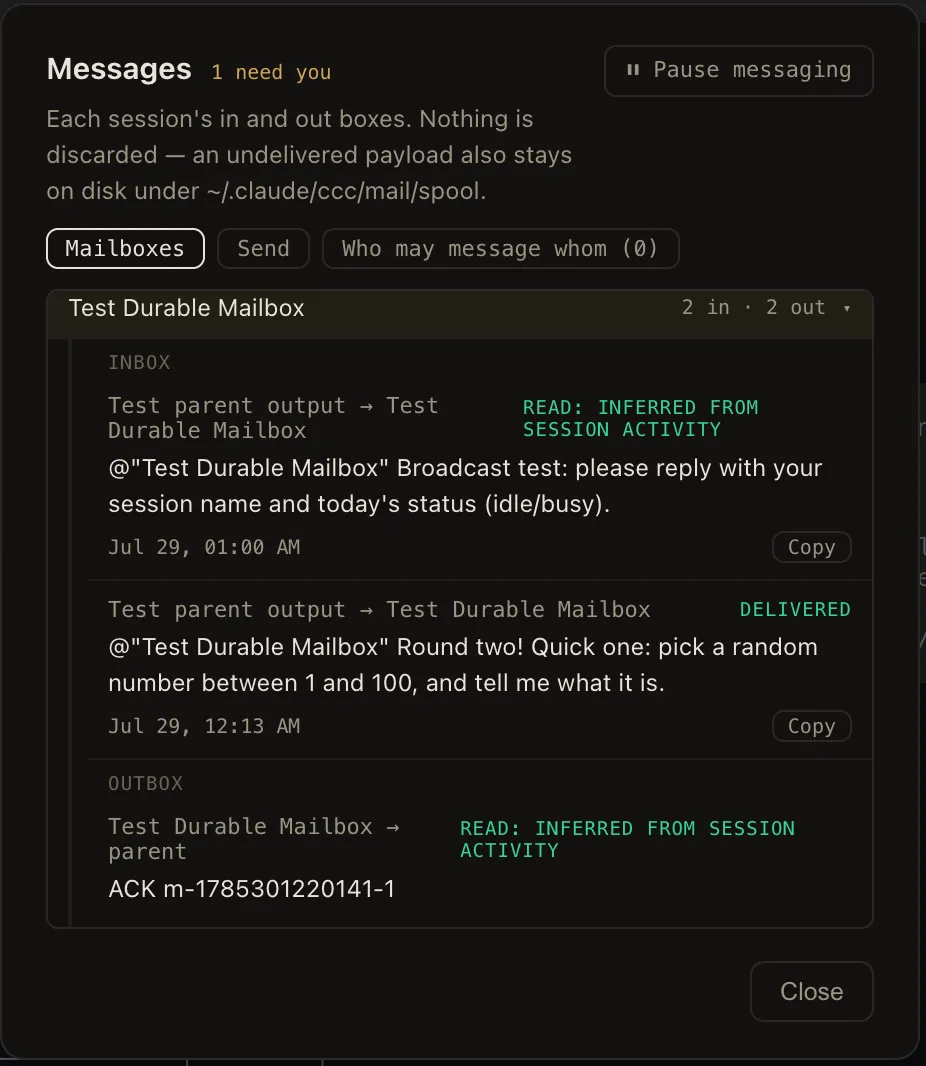
Grouped by session, ordered by what needs you. Read state distinguishes acknowledged from inferred.
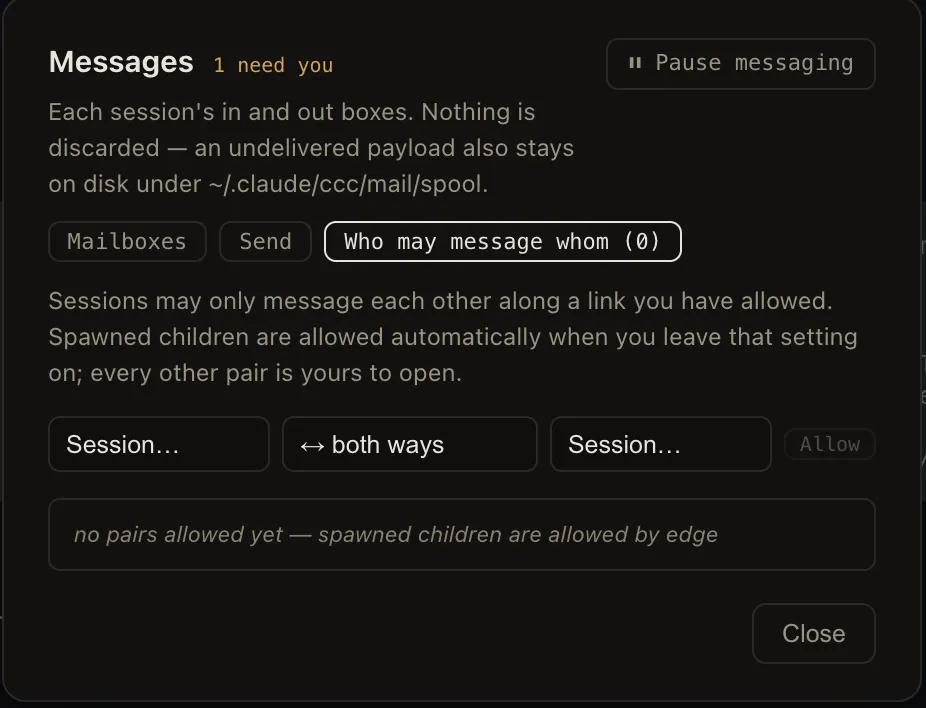
Every pair that may message is yours to open and yours to revoke.
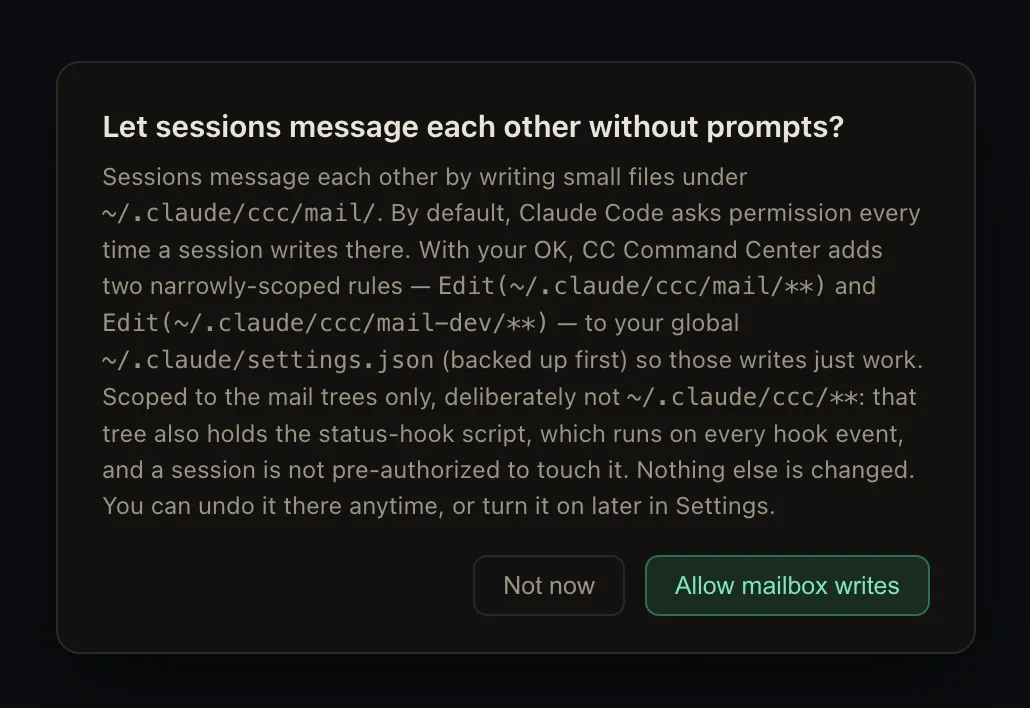
The app names both rules it will add, says why it avoids the wider tree, backs up the file first, and works fine if you decline.
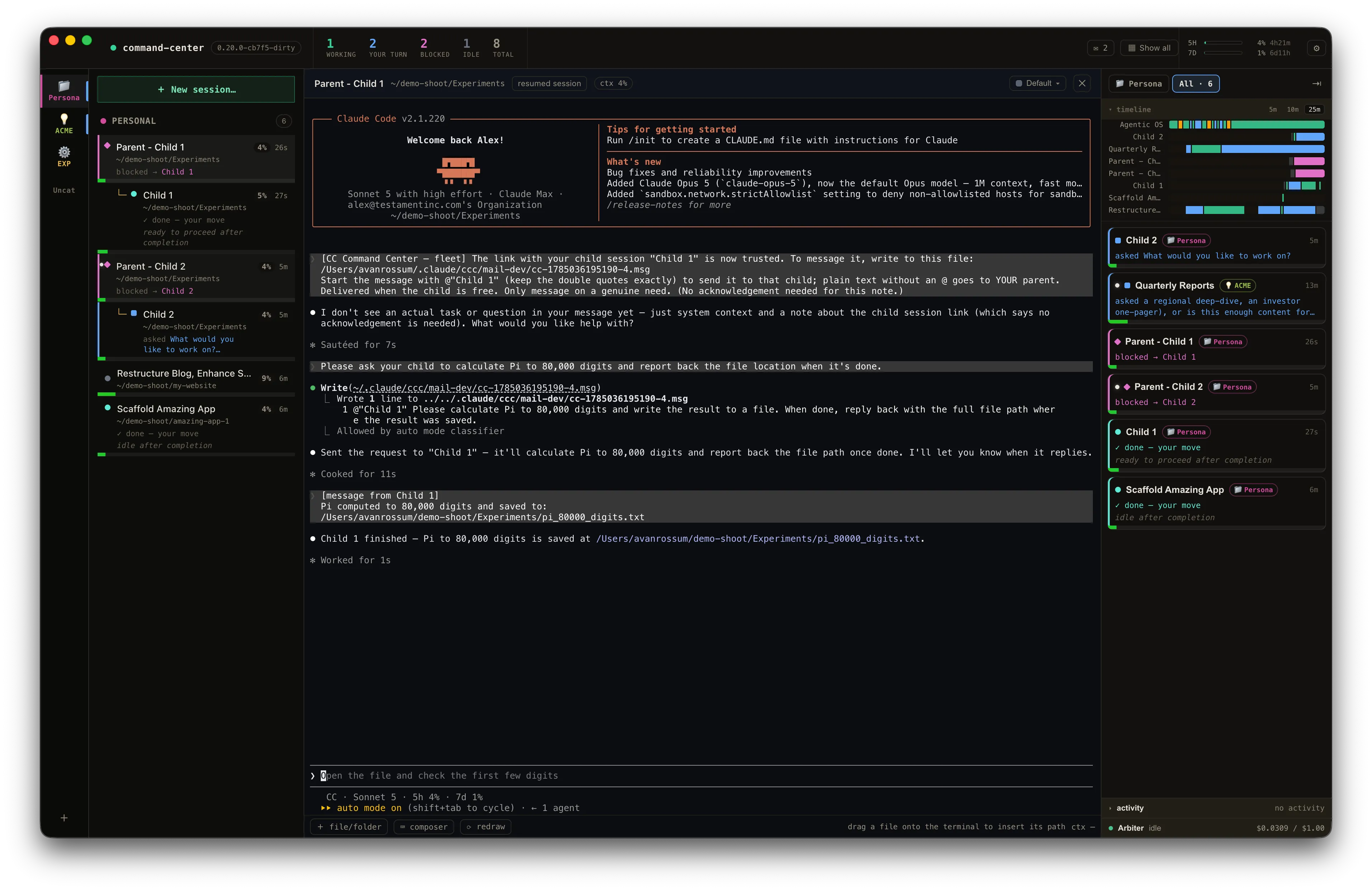
A parent handing work to a child and getting a result back.
Intended Use
Every mechanism here assumes you're the one starting it.
You spawn the child. You open the link between a pair. You ask the parent to brief it. Messages deliver into a session you're sitting in, or one you left running deliberately, and the whole triage surface exists so that you come back to things rather than so that they proceed without you. That's what the app is for, and it's the shape I built and tested against.
Used that way, I've worked hard to keep it consistent with the Claude Code CLI's terms of service. Nothing in it is trying to be a workaround.
Wire enough grants together, leave sessions running in auto mode, and you have the makings of an unattended automation harness driving subscription sessions. The app won't prevent that. Once you've opened the links, mail delivers, and there's no check I could add that reliably tells a chain you're supervising apart from one you walked away from.
So, plainly: if you're building full-scale automation, run it on an API key with metered billing. The per-session API key feature exists for exactly that, which is why it's in here at all. Read the Claude Code terms yourself and make your own call. Nothing on this page is legal advice, and this is one of the few places in the app where the guardrail has to be you.
The Organizing Idea
HITM — Human In The Middle
Human-in-the-loop puts the human at the edge of an automated pipeline, working as a gate that approves or rejects what passes through. Human-in-the-middle puts the human at a node inside the mesh — sitting in a session, able to message any other session, be messaged, spawn new ones, and watch the whole bus.
The name borrows the security sense of "man in the middle" on purpose. An attacker in the middle of a channel can do three things: read the traffic, drop or alter it, and inject its own. The app hands all three to you.
Every session's inbox and outbox, each row carrying both endpoints, delivery and read state, the reason it's stuck, attempt count, timestamps, and the full body.
A pause that survives a restart, revocable grants re-checked at delivery, cancel on a single message, per-pair and per-session budgets, and a fleet-wide breaker.
Cross-session send, broadcast to many at once, spawn-a-child-with-context, and selection-to-tangent from the terminal.
Depth
Two panels for the questions a status color can't answer.
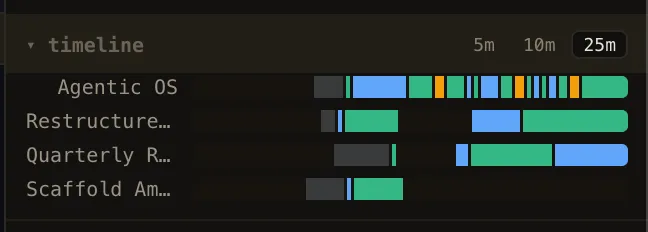
Timeline swimlanes
Per-session lanes recording each state change over a 5, 10, or 25-minute window, which is how you tell a session that's been grinding for twenty minutes from one that just flipped to your-turn.
Fleet activity
Every subagent, workflow run, and background shell task the fleet has spawned, grouped by owner. A session running a long build stops reading as idle, and you can see what's actually consuming the account.
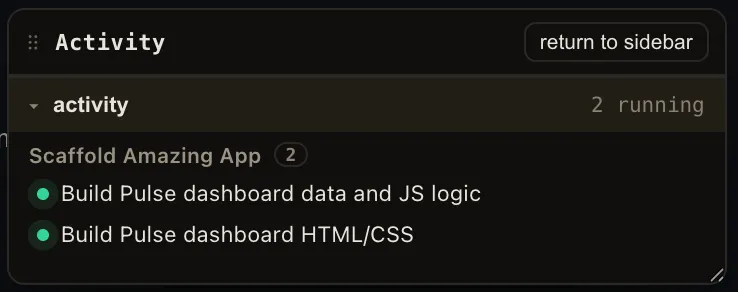
Both panels pop out into draggable floating cards that stay visible when the sidebar is collapsed.
Digests
The things worth knowing that nobody is going to interrupt you about.
You accumulate signal you can't watch in real time. A repo that's been mid-refactor for nine days. A secret committed on Tuesday. A test that fails one run in five. It's all already on disk somewhere, and noticing it means either interrupting your work to go check or remembering to check later, neither of which happens.
Digests is a docked panel under the session list, folded until you want it. Something you write watches whatever you care about on its own schedule and drops a JSON file in a directory. The panel finds it, counts what's unread, and gets out of the way.
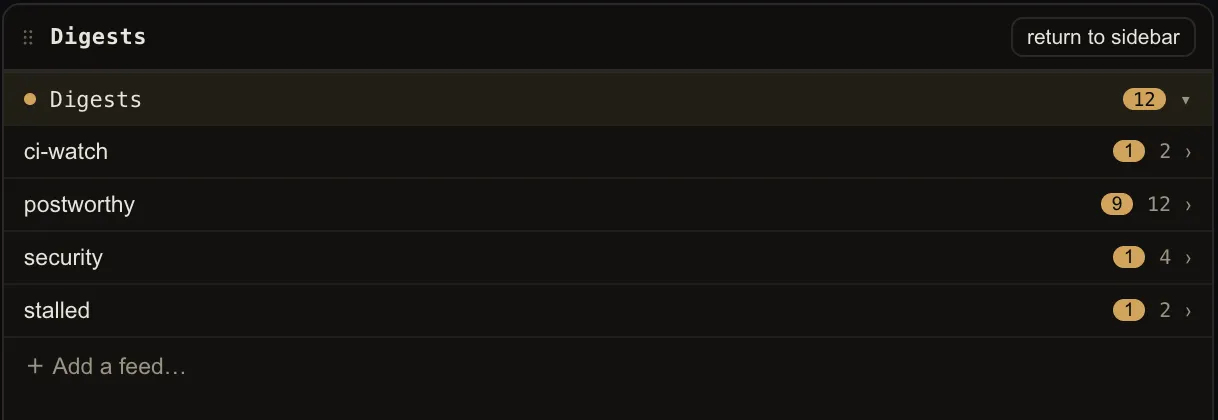
Every source you feed it, with what's waiting in each.
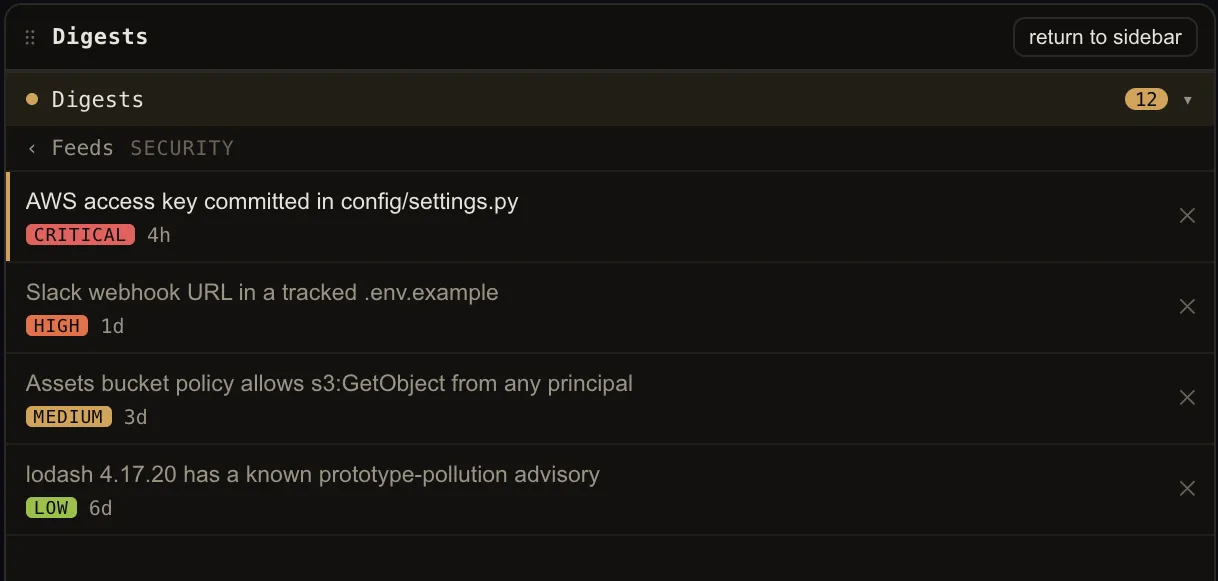
Sorted by when the thing happened, not when it was noticed.
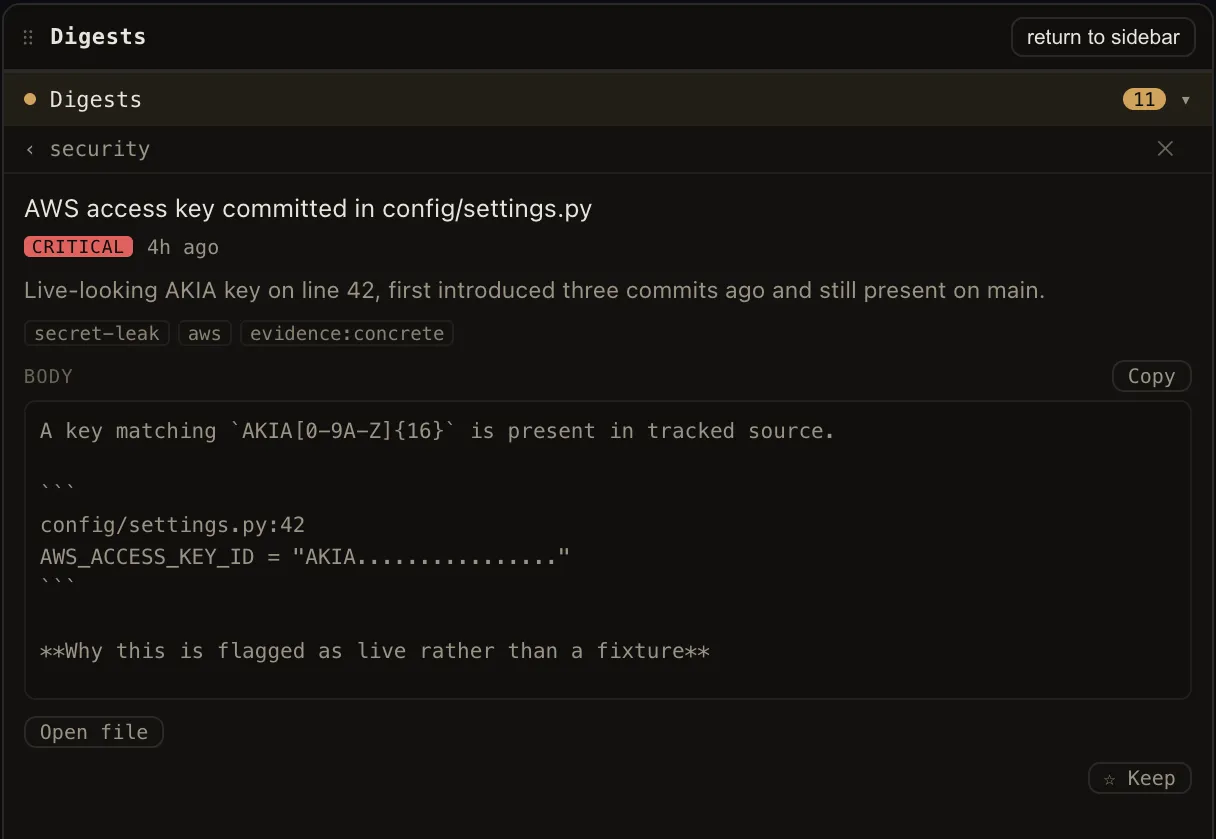
The whole item, with a copy button that takes all of it.
The panel lists a directory. A producer written a year from now appears with no change to the app, and one that stops running just stops adding items.
Not when it was noticed, so a source backfilling a week of history doesn't read as one very busy afternoon.
A score renders as a number and a severity as a colour, so a source picks whichever fits what it watches.
Opening an item marks it read. Dismiss it and it stays gone even though the producer keeps running. Keep it and it stays as a working set.
Items can carry actions; the app reveals a path in Finder and renders anything else inert. These files are written by unattended jobs, and treating a value in one as a command would make every producer a shell.
Sources, then that source's items, then the item itself. Pops out into a floating card like Timeline and Activity.
The panel has no idea what your signal means, which is exactly why it works for any source, and also why it can't invent one for you. Point it at a directory and it surfaces whatever is there; until something is writing to that directory, it's an empty panel. Writing a producer is a JSON file in a directory, in whatever language you like, with no library and no dependency on the app, so budget an afternoon for the first one. What you get back is never writing the surfacing half again: the panel, the unread counts, the read and dismissed and kept states, the sorting, all of that is done for every source you ever add.
How to write oneOptional
An agent that explains what each blocked session wants.
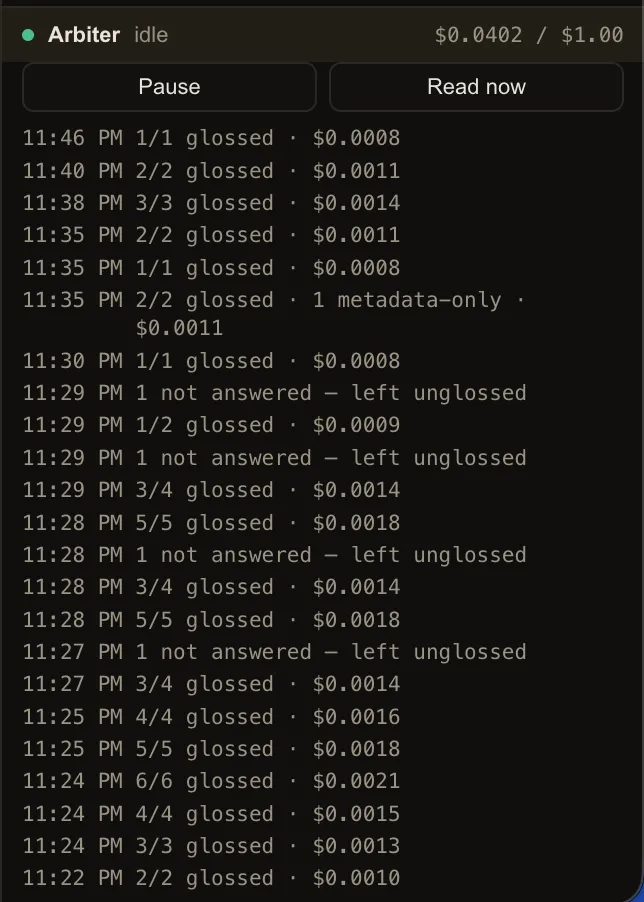
The Arbiter is a read-only helper that writes a one-line plain-English note for each session waiting on you — "wants to delete the migrations folder" — rendered inline on the session row. It runs on a metered Anthropic API key, is off unless you turn it on, and takes no action of its own.
Every billable call records its usage, the running total sits on the Arbiter bar at all times, and a daily cap is checked before each request and stops the agent when it's hit.
Session substance and names go to the API only for categories you explicitly cleared. Everything else sends state and shape alone, with the name replaced by a stable handle.
Three classes — needs permission, wants your input, finished a task — with per-category overrides so client work is loud and personal work stays quiet. They never fire while the app is focused, and clicking one opens that exact session.
Output
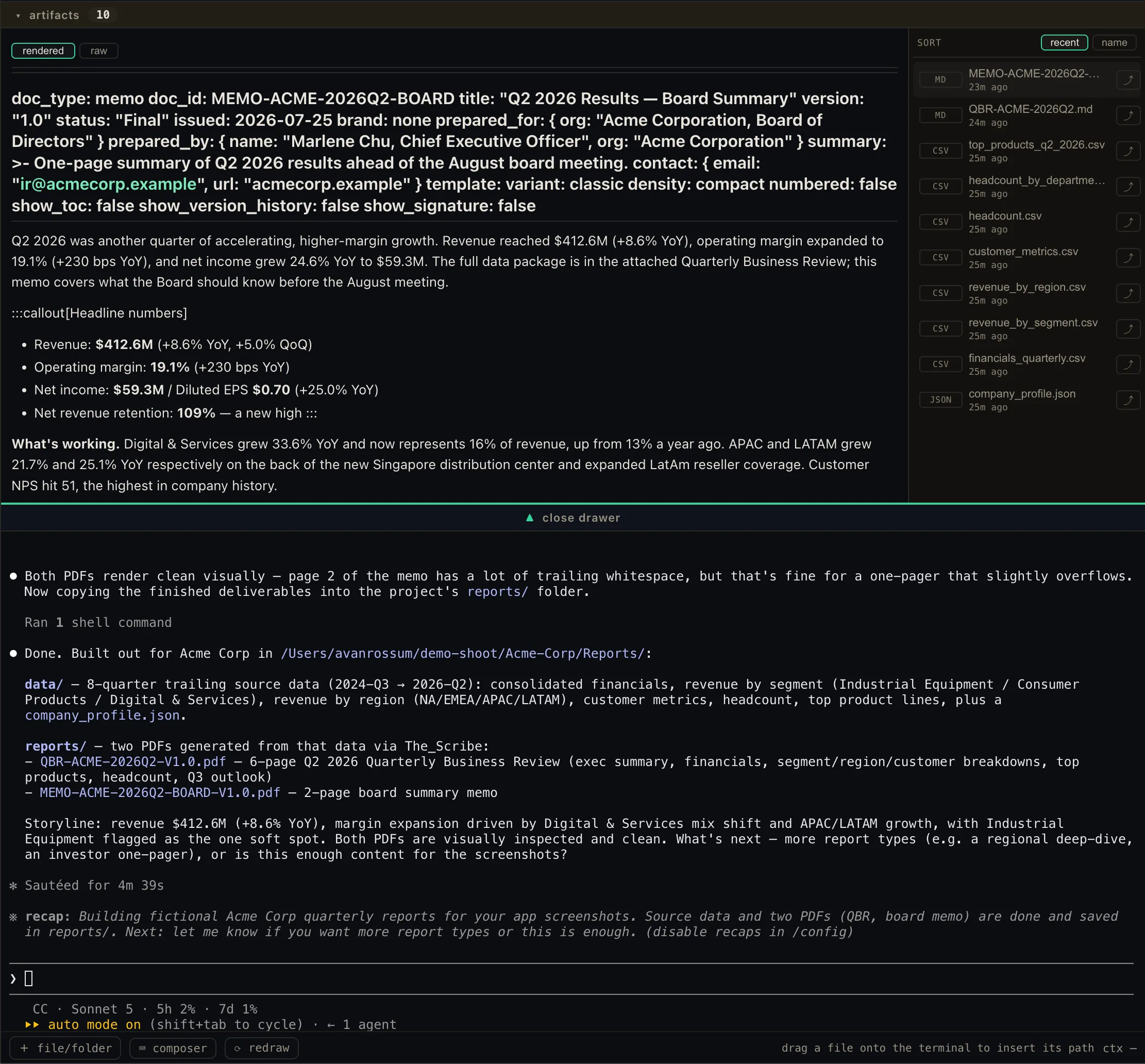
See what a session produced without hunting through Finder.
A drawer folds down over the open session's terminal and renders what that session made — images and SVG, an inline audio player, syntax-highlighted code, rendered Markdown, RTF — alongside a sortable, timestamped list with Open and Reveal in Finder on each item. Detection is passive and session-scoped, reading the session's own transcript plus a shallow scan of its working directory, so the drawer stays accurate even in a shared project folder.
Nine color themes and a configurable monospaced font, with discovery filtered to genuinely monospaced families so a proportional font can't wreck the TUI alignment.
Drop a file from Finder to insert its full path at the cursor, and Cmd-click any path Claude prints to open it in the OS.
A metered session gets a per-session capability token, not the key. An owner-only local daemon exchanges it in memory, so the key never enters the child's environment, a file, or a process listing.
A dual-bar meter shows how close the account is to its 5-hour and 7-day limits and when they reset, so you can pace fan-out work before you get throttled.
Who It's For
One operator, a lot of sessions.
A single technical operator — developer, founder, or architect — running roughly 5 to 25 Claude Code sessions at once across personal projects, their own business, and multiple clients. If you're comfortable with terminals and keyboard-driven tools, and you keep losing track of which agent session is waiting on you, that's the person this was built for.
Adopt
Open the app and every live session appears with its current state, no relaunch needed.
Triage
The beacon bar and overview show which sessions are waiting, what each wants, and how they relate.
Dive in
Click the session that needs you and land in its live terminal, ready to answer.
Security & Privacy
It handles credentials and edits your global Claude config.
Both of those deserve to be documented rather than assumed, so the handling is written out in full in SECURITY.md. The single-user desktop boundary is your own account.
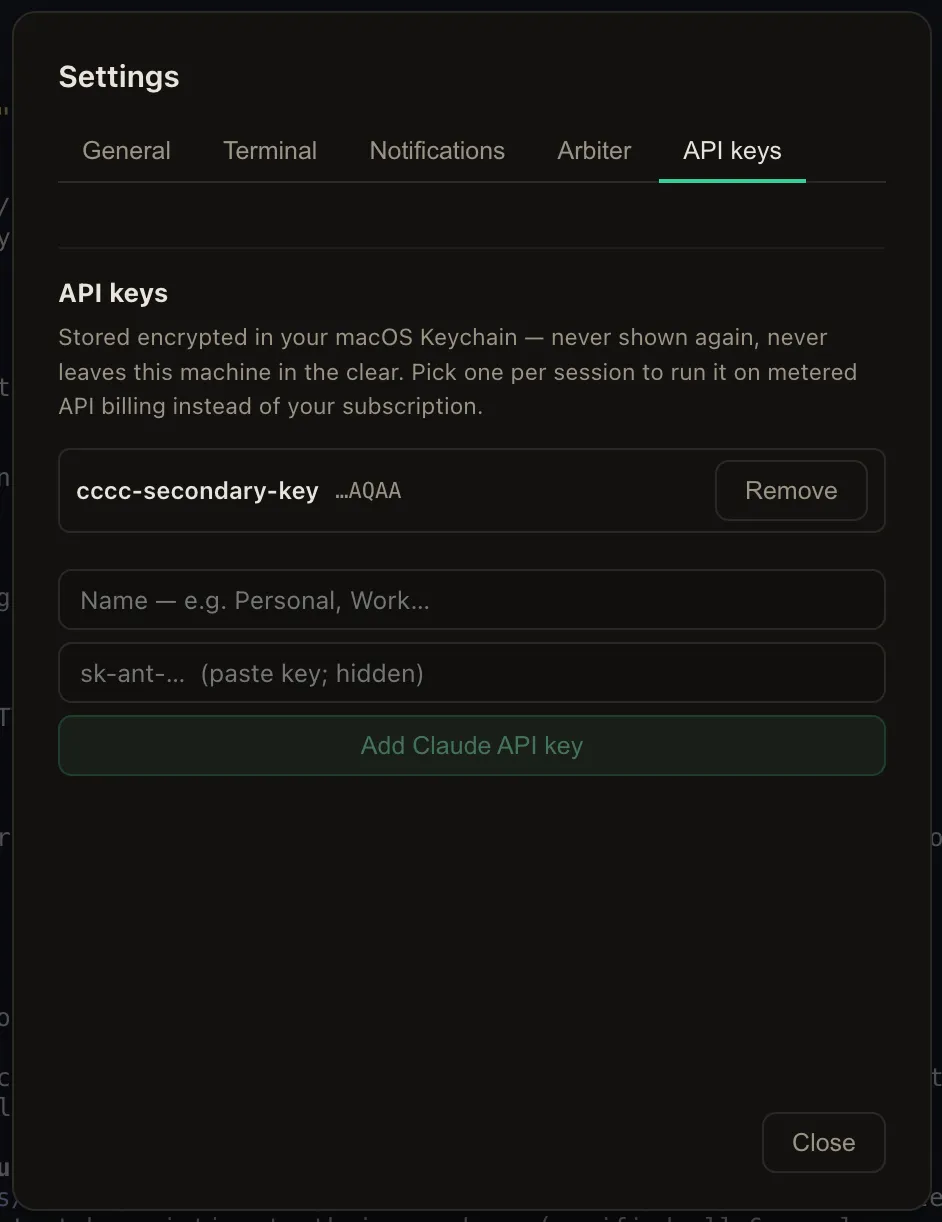
Electron safeStorage backed by the macOS Keychain. If secure storage isn't available the app refuses to store the key rather than falling back to plaintext, and a key is never displayed again after entry.
A metered session is spawned with a per-session capability token instead of the key, and a local owner-only 0600 socket exchanges it in memory at the moment of use. The token is minted at spawn and revoked when the PTY exits, and the decryption path is main-process only, never exposed over IPC. So the key never lands in a process listing, an environment dump, or a file on disk — which is a narrower claim than it first sounds, for the reason below.
Changes to ~/.claude/settings.json are backed up first as a hard precondition, written atomically, refused rather than repaired if the input is malformed, and scoped to the mailbox trees only. Unrelated keys are preserved.
The app phones home to nothing. The awareness bus and the message log are local files. The only outbound calls are the optional Arbiter, under your own key, and the update check against the public releases repo.
The token narrows which key a session can reach and for how long. What it can't do is stop the session from making the exchange itself: the helper exists so the session can fetch the credential, so anything running with that session's environment can invoke the same helper — including a shell command arriving through prompt injection. A session authorized to use a key is, by construction, able to read it. That's inherent to supplying a credential, not a bug a patch removes, and the mitigations are operational: don't hand high-value or broadly-scoped keys to untrusted work or to anything running auto-approve, set a per-key spend limit in the Anthropic Console, and rotate promptly.
What This Is
I built this for me. You're welcome to it.
It's a solo project in active beta (0.2x, and releasing often enough that pinning a number here would be a lie by the time you read it), macOS on Apple Silicon only, and it needs the Claude Code CLI already installed plus a Claude subscription and/or an Anthropic API key. It's independent — not an official Anthropic product, and not affiliated with or endorsed by Anthropic.
It works against internal parts of Claude Code that aren't a public API: the transcript format, the session registry files, hook payloads, terminal rendering. An upstream release can break it. It's Apache-2.0, so you can fork it and go. There's no support SLA and no roadmap I'm promising anyone, and while feedback and issues are genuinely welcome, I might not act on any of them.
What I will say is that I use it every day and have no interest in going back to a screen full of terminal windows, which is a more reliable maintenance guarantee than most support policies.
Technical Stack
Issues & Contributions
Broke something? Tell me about it.
The most useful reports are the ones where an upstream Claude Code change broke state detection, because those break it for me too.
Stop counting terminal windows.
Free, open source, and built by someone who runs fifteen of these at a time.