Why Your Page Builder Site Goes White After a Cache Purge
A client calls, they are upset, and their site is broken. The homepage is a wall of unstyled text, or it’s completely white. They didn’t touch anything. The hosting company didn’t touch anything.
Nobody touched anything.
What happened is a cache purge. Maybe WP Rocket ran its scheduled clear. Maybe someone updated a plugin and LiteSpeed invalidated everything. Maybe Cloudflare’s cache expired. Maybe Divi decided it didn’t like it’s current CSS stack and said “I’m deleting all of them.” The cause doesn’t matter — the symptom is the same: visitors are seeing a site without CSS.
And it fixes itself on (hard) reload. Sometimes. Which makes it worse, because now the client thinks it was a fluke and the developer can’t reproduce it.
It’s not a fluke. It’s a structural problem in how page builders interact with caching layers, and it has three distinct failure modes.
The architecture of the problem
Page builders — Divi, Elementor, Beaver Builder, Bricks, Oxygen — generate per-post CSS files on first render and store them on disk. Divi puts them in et-cache. Elementor uses /elementor/css/. Beaver Builder uses bb-plugin/cache. The specifics vary, but the final pattern is the same: CSS doesn’t exist as a static file until someone visits the page.
This is fine under normal operations: the first visitor triggers the render, the CSS is written, and every subsequent visitor gets it from disk. The caching plugin serves the HTML from cache, the browser fetches the CSS, everything works.
Until the cache purges (or Divi decides it doesn’t like the CSS stack).
Failure Mode A: Origin cold start. The page cache clears. The next visitor triggers a fresh PHP render. The page builder starts writing CSS for that page during the render. Everyone who arrives in the window between “cache purged” and “CSS written to disk” gets a 404 on the stylesheet. They see unstyled content.
Failure Mode B: Cloudflare serving stale HTML. Cloudflare has your HTML cached at its edge. That HTML references CSS files that no longer exist at origin. Cloudflare serves the HTML (fast!), the browser requests the CSS, Cloudflare tries to fetch it from origin, gets a 404. This happens even when your origin server is perfectly healthy. Cloudflare is doing exactly what it’s supposed to — serving cached content. The problem is that the cached content is wrong.
Failure Mode C: Page cache and CSS out of sync. The server page cache is serving HTML that was generated before the most recent CSS regeneration. The HTML references old filenames. The new CSS files exist on disk, but the HTML is pointing at paths that have changed.
Three failure modes; three different layers. This is why “just clear the cache again” doesn’t always reliably fix it — you’re addressing one layer while the other two are still broken.
The fix is layered because the problem is layered
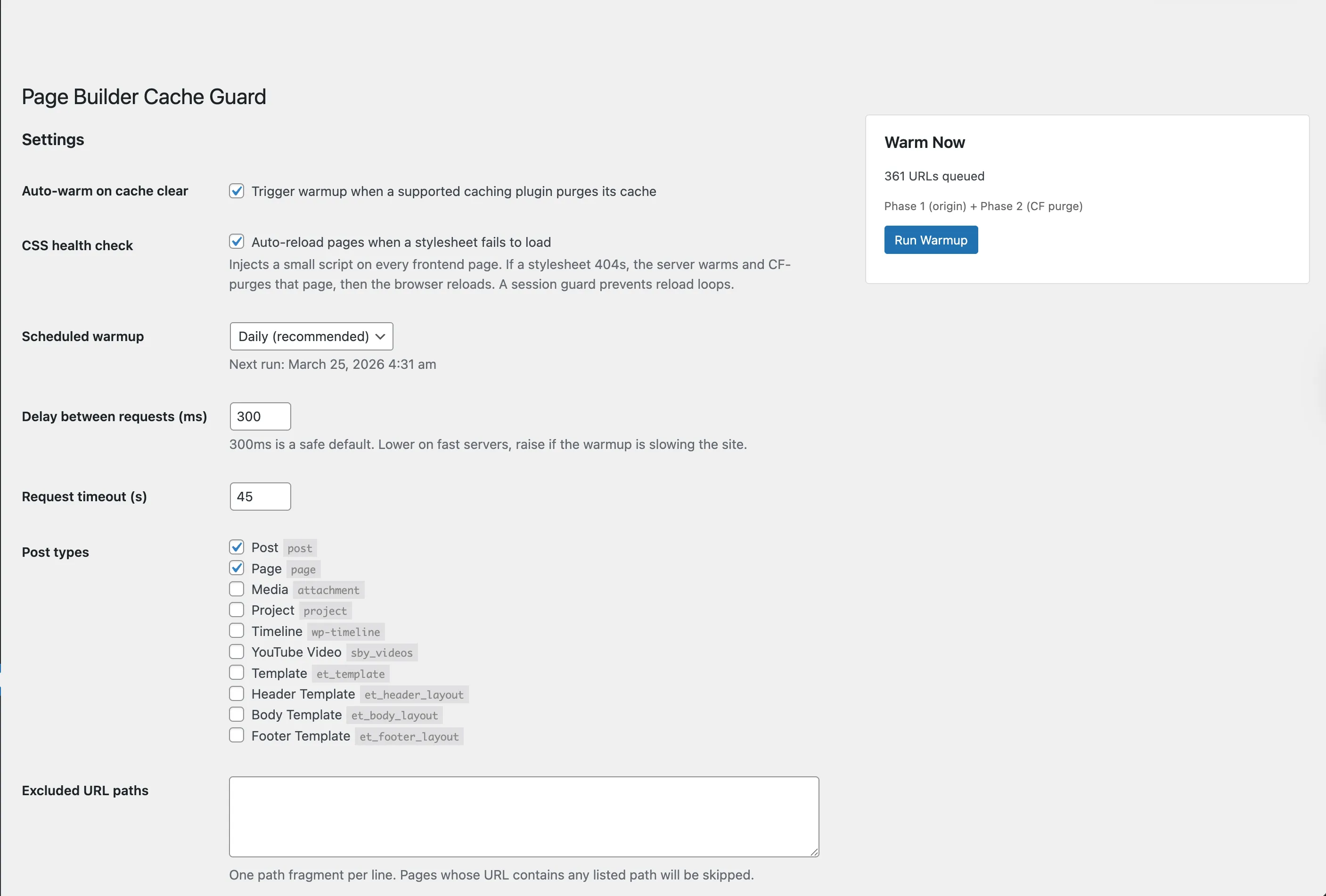
I built Page Builder Cache Guard to address all three failure modes in sequence.
Phase 1: Force origin warmup. After any cache purge event (or on a schedule, or manually), the plugin crawls every published page with a cache-bypassing query string. This forces the server to skip its page cache and run a full PHP render. The page builder writes all CSS files to disk. When real visitors arrive, the CSS is already there. The bypass token is randomized per run so CDN edges also treat each request as uncached.
Phase 1b: Server page cache purge. After regenerating CSS, the plugin purges the server-side page cache entry for the affected URL. This ensures the next request gets fresh HTML with correct CSS references — not the stale cached version that caused the problem.
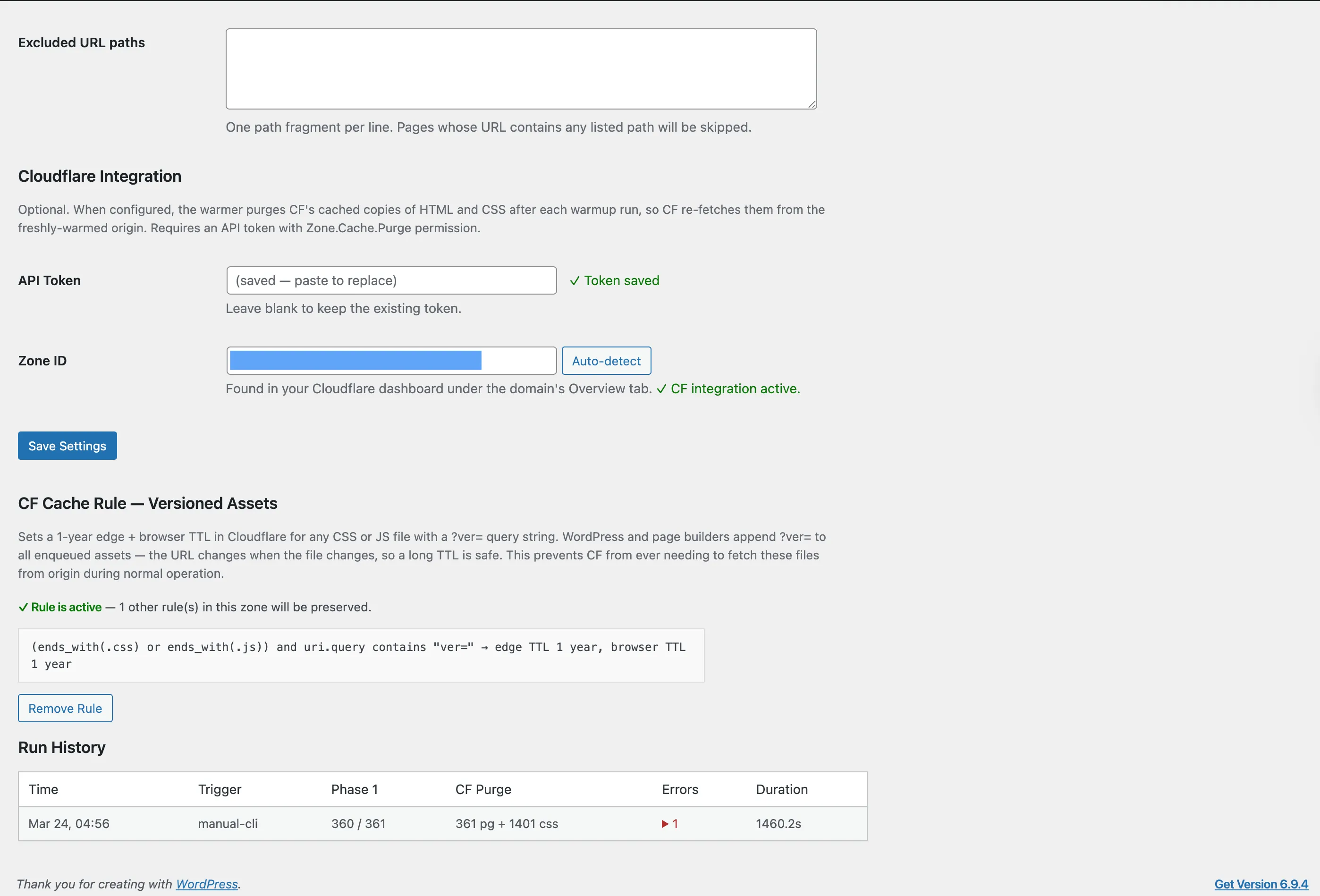
Phase 2: Cloudflare cache purge (optional). If you have a Cloudflare API token configured, the plugin tells Cloudflare to drop its cached copies of your HTML and page-builder CSS. Only targets dynamic CSS paths — stable WordPress assets are left alone. Cloudflare re-fetches from your now-warm origin on the next real request.
The last line of defense
The three phases handle the proactive case: cache purges, you warm before visitors arrive. But what about the gap? What if a visitor hits the site before the warmup runs?
A client-side CSS health check handles this. About 600 bytes of inline JavaScript. After page load, it checks whether every stylesheet loaded successfully. If any returns 404, it calls a heal endpoint that runs Phase 1 + 1b + 2 for that specific URL, then reloads the page. A session storage guard prevents reload loops.
It’s the architectural equivalent of a circuit breaker. The proactive system should catch everything. The health check is there for when “should” meets reality.
Why this matters beyond WordPress
This issue isn’t unique to page builders, but they do seem to surface it frequently. It’s a caching coherence problem — multiple layers of cache (origin page cache, CDN edge cache, CSS file cache) that can independently become stale and serve inconsistent content.
The same class of problem shows up in Kubernetes deployments where pod restarts clear in-memory caches while the CDN still serves old assets. It shows up in Jamstack sites where the build output and the CDN edge can briefly serve different versions of the same page. The failure mode is always the same: layered caches with independent invalidation timelines.
The fix is also the same class of fix: warm from the bottom up, invalidate from the top down, and add a client-side check for the cases your proactive system misses.
Free, open source, GPL-2.0. Works with any page builder that generates CSS on first render. Cloudflare integration is optional.
For the methodology behind building tools like this: What Is Pass@1?. For why governance documents make this kind of rapid build possible: The Governance Documents.
Running WordPress and wondering how much of this applies to your setup? The WordPress diagnostic checks your site’s caching, performance, and plugin health — results in two minutes.
Or get new posts in your inbox
Occasional writing on systems, ADHD, and AI. No cadence pressure.
You're in. I'll send you the next one.