SideMark: A Free Markdown Editor for macOS (Open Source)
I didn’t plan to build a markdown editor this weekend. I was working on something else entirely, and somewhere in the middle of it I opened my markdown editor to take notes and my annoyance with every markdown editor I’ve tried finally reached a head.
Not annoyed in the “this is broken” sense. Annoyed in the “why does this app need a cloud account and fourteen features I’ll never use” sense. The editor I’d been using was fine, except for the parts that weren’t: slow to launch, too many menus, features designed for someone else’s workflow. And every alternative I’d tried over the years had the same problem in different packaging — too expensive, too bloated, or too clever.
So I opened Claude Code and started building one.
Governance did the heavy lifting
Three panes. File browser on the left, editor in the middle, live preview on the right. Tabs for multiple open files. Session restore — close the app, reopen it, everything’s still there. Dark mode. Search and replace. A formatting toolbar for the things I always forget the syntax for (is it **bold** or __bold__? I know the answer but my fingers don’t).
That’s it. No cloud sync. No collaboration. No plugin architecture. No knowledge graph. No proprietary file format. Just markdown files on my computer, edited in a clean interface that stays out of the way.
But the reason the first pass came back essentially usable wasn’t the prompt — it was everything behind it. The governance documents I’ve built for my development workflow, the clean wireframes, the detailed architecture specs, the personal style guide that must be followed. All of that is persistent context that Claude Code carries into every session. The prompt describes what to build. The governance documents describe how to build it, and to what standard. That’s the difference between “a thing that kind of works” and “a thing I’m actually using the next day.”
Not perfect on the first pass. But functional enough that I was taking notes in it within the first hour.
Then I started tweaking.
What “good enough” turned into
The initial version worked. But “works” and “feels right” are different things. The scroll sync between editor and preview was off — I built bidirectional section-based anchoring so they stay aligned as you scroll. The formatting toolbar was basic — I made buttons detect whether formatting was already applied and toggle it off, made heading buttons cycle through levels, made list buttons handle multi-line selections and continue numbering from preceding items.
File browser needed right-click context menus. New file, new folder, rename, delete (move to trash, not permanent — I’m not a monster), show in Finder. Auto-refresh when files change externally. Only markdown files clickable in the tree, because I don’t need to accidentally open a PNG in a text editor.
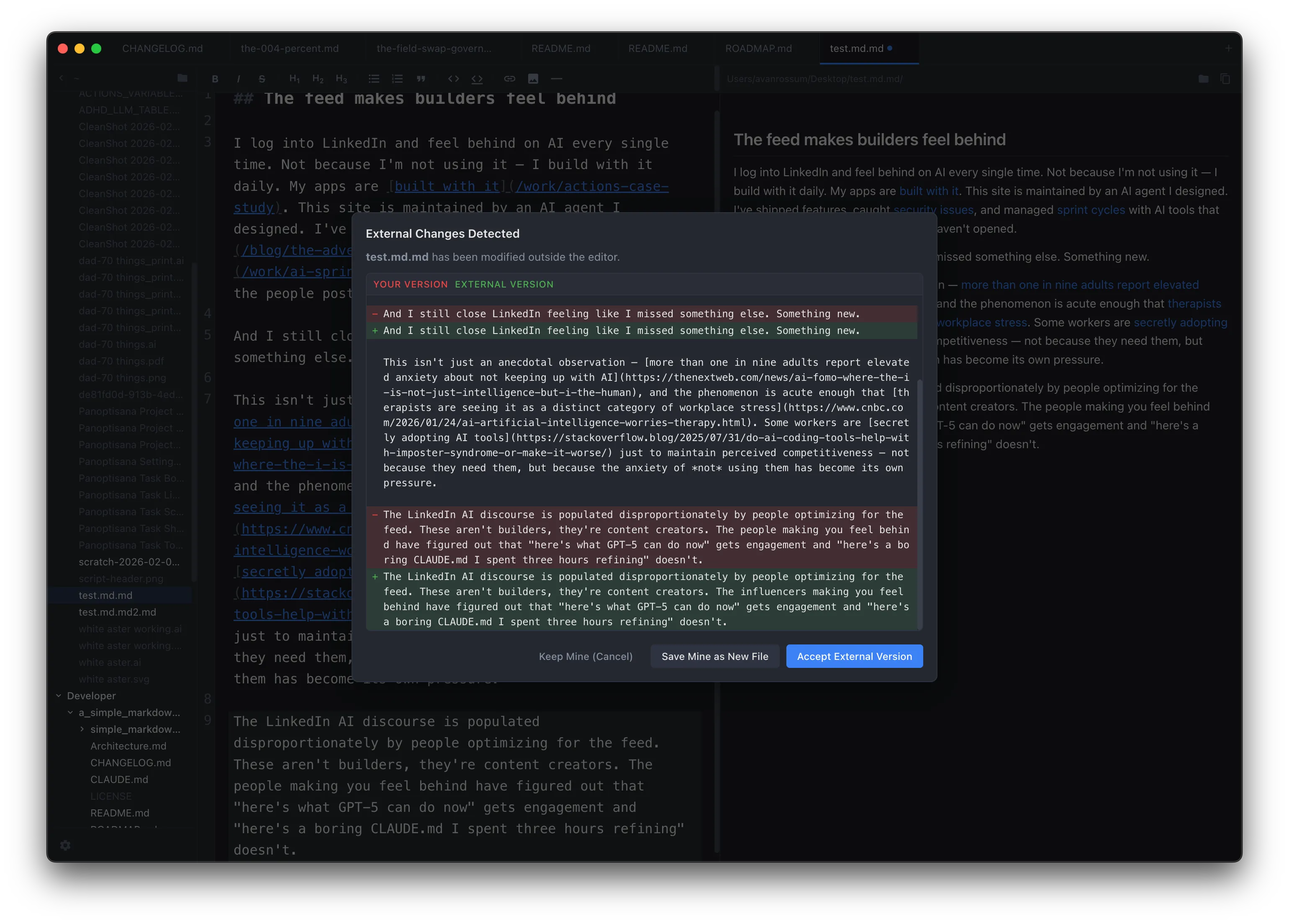
External change detection was the feature I didn’t know I needed until I hit the workflow. Edit a file in another app while it’s open in the editor — you get a full diff view showing exactly what changed, with options to keep your version, accept the external changes, or save as a new file. No silent overwrites. I’d completely forgotten I’d even added it until I triggered it accidentally and thought oh, that’s actually amazing.
Then themes — dark, light, system-following. Seven accent colors because I like options. Configurable fonts for both the editor and preview panes, pulling from your system font library. Font size control. Line number toggling. Settings that persist to JSON.
Then security hardening, because I ran The Adversary on it — my adversarial code review agent — and it found the usual Electron problems. Worse than usual, actually. The irony it identified was the ceremony of security without the substance: contextBridge, contextIsolation: true, proper cleanup functions — all present, all technically correct, and all masking a straight pipeline from a malicious .md file to arbitrary filesystem access. The sandbox: false with a wrong justification comment was the cherry on top. It’s exactly the kind of thing that survives code review after code review because it sounds right, and nobody actually traces the dependency to verify it.
XSS vectors in the markdown preview (fixed with DOMPurify), filesystem access too broad (added path validation and sensitive directory blocking), missing Content Security Policy. Twenty-plus security fixes across eleven versions. The kind of work nobody sees but everyone benefits from — and a textbook case study for why adversarial review matters when the current “vibe coding” wave is producing technically-functional-but-exploitable software at scale.
Thirty-one versions in two days
The commit history tells the story. v0.1.0 to v0.1.31 in a weekend. Not because I was rushing — because the governance-first development pattern means each feature lands cleanly, gets tested, gets committed, and the next one starts from solid ground.
This is the same workflow I write about in every blog post: strong governance documents as persistent AI memory, single-pass feature delivery as the norm rather than the exception, architecture decisions codified before implementation begins. When the pattern works, it works at speed.
The app is signed and notarized with Apple, auto-updates from GitHub releases, handles file associations (shows up in Finder’s “Open With” menu for .md, .markdown, .mdx, .txt files), and restores all windows with their tabs and folder paths on relaunch.
What it deliberately doesn’t do
No cloud sync. No collaboration. No Vim mode. No WYSIWYG mode. No plugin system. No account creation. No subscription. No telemetry.
Every markdown editor eventually tries to become a knowledge management platform. This one won’t. The file system is the organizational layer. Git is the version control. Markdown is the format — portable, readable, owned by you. The editor just makes working with those files fast and pleasant.
Your files are plain markdown on disk. Open them with anything, anywhere, forever.
The actual point
I built this because I needed it, and now I’m using it instead of every other option. More dogfood. It’s open source (MIT), free, and the code is on GitHub.
If you live in markdown daily and every editor you’ve tried wants to be something it shouldn’t be — try it. The feature list is short on purpose.
Simple Markdown Editor is available on GitHub — free, open source, macOS only. If you’re interested in the development methodology behind building a functional app in a weekend, start with What Is Pass@1?.
Or get new posts in your inbox
Occasional writing on systems, ADHD, and AI. No cadence pressure.
You're in. I'll send you the next one.