Built for the ADHD workflow
Asana has too many things.
You opened Asana to check one task. Now you're three clicks deep in a project timeline you didn't need, the sidebar is showing you twelve boards, and there's a banner about a feature you'll never use. What was the task again?
Panoptisana strips all of that away. One window. Your tasks. Searchable, filterable, and accessible with a keyboard shortcut from anywhere on your Mac.
The Real Problem
Asana is a project management tool.
You need a task management tool.
Asana is designed for teams running planning sessions. Boards, timelines, portfolios, goals, milestones, workload views. For someone managing a team's quarterly roadmap, that's great. For someone with ADHD who just needs to know "what's going to bite me first and hardest" — it's a sensory overload machine.
You don't need to see the timeline. You don't need the portfolio view. You don't need the board layout with swimlanes and color-coded status pills. You need a flat list of your tasks, sorted by what matters, with enough detail to act on them.
That's it. That's the whole product.
What You've Tried
Every workaround that made it worse.
"My Tasks" in Asana
Technically exists. But it's embedded inside the full Asana UI — sidebar still visible, notifications still popping, that "Upgrade to Business" banner still there. Your brain is processing all of it whether you want it to or not.
Pinned browser tab
You pinned Asana so it's "always there." Except now you have 40 tabs and the pinned one loads a full web app every time you switch to it. And you need to find the tab first. And then navigate to the right project. And then remember what you were looking for.
Duplicating into another app
You've tried pulling Asana tasks into Todoist, Notion, or Apple Reminders for a "simpler view." Now you have two systems to maintain, they're out of sync by noon, and you've added a meta-task: "keep the task lists aligned."
The ADHD visibility trap:
too much information, not enough signal.
Asana shows you everything because it's built for people who plan. Timelines, dependencies, progress bars, portfolio views — all useful in a planning session, all irrelevant when you're in the middle of actual work and just need to know what's next.
For ADHD brains, every piece of visible information is a potential distraction. The planning UI isn't just unnecessary — it's actively hostile to the "what do I do right now" question you're trying to answer.
The Fix
One window. Your tasks. Nothing else.
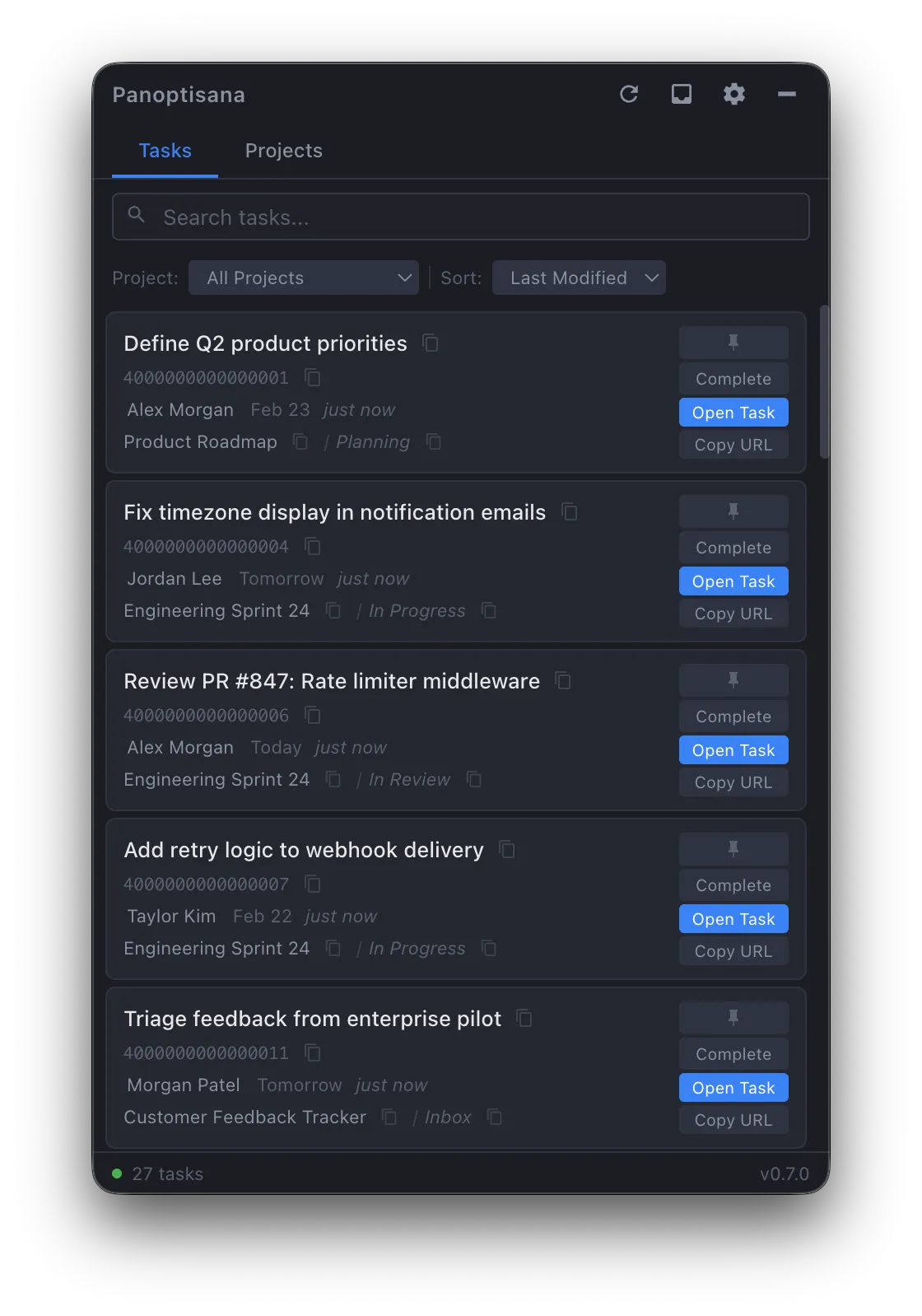
Panoptisana is a macOS menu bar app that talks to Asana's API and shows your tasks in a flat, searchable list. No boards. No timelines. No portfolios. No sidebar. No banner ads for enterprise features.
Press a keyboard shortcut. The window appears. You see your tasks sorted by last modified, with the project name and assignee. Type to search. Click to see the full detail. Press Escape. It disappears. You're back to what you were doing.
The entire interaction takes seconds, not minutes. No browser involved. No context switch.
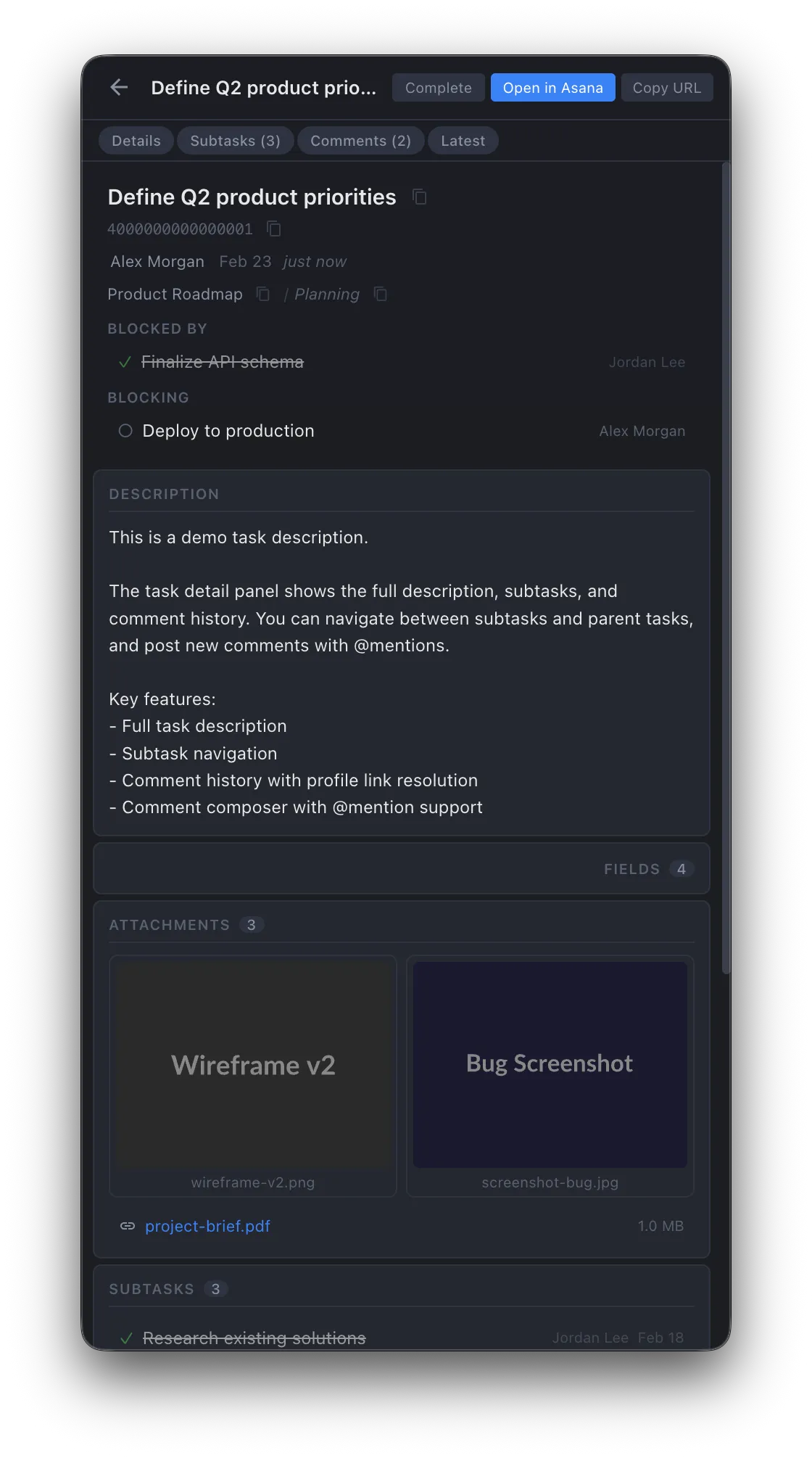
Full Task Detail — Without Opening Asana
Why This Works
Designed around how ADHD brains actually process tasks.
Reduced visual noise
No sidebar. No navigation breadcrumbs. No project boards visible behind your task. Just your tasks in a dark, focused window. Your brain only has to process what's in front of you — which is exactly and only the thing you need.
Instant access, instant dismissal
Global hotkey summons the window. Escape dismisses it. No Dock icon, no Cmd+Tab entry. The app exists only when you need it. This matters for ADHD — tools that stay visible become background noise. Tools that appear on demand stay useful.
Filter to what matters right now
Search narrows instantly. Filter by project. Pin the tasks that are actually urgent. The list shrinks to exactly what you need to focus on — not everything assigned to you across every project you've ever been added to.
See enough to act, not enough to spiral
The task list shows the task name, project, assignee, and last modified date. That's enough to triage. Click in for full detail when you need it — descriptions, comments, subtasks, attachments. The depth is there; it's just not in your face by default.
The Other Reason It Exists
Built for automations.
Also built for ADHD.
Here's the honest origin story: I didn't start building Panoptisana as an "ADHD tool." I started building it because I needed to copy Asana GIDs for my automations, and Asana buries them behind developer tools.
But I also have ADHD. And those automations? I built them because of ADHD — because manually repeating workflows is the kind of friction that causes my brain to drop things entirely. The whole stack is cognitive offloading: automate the repeatable, surface the important, hide the noise.
So the GID tool grew. Task details appeared because I needed them. Inbox because I was missing comments. Search because I couldn't find things. Every feature exists because I hit a friction point in my own ADHD workflow and couldn't leave it unresolved.
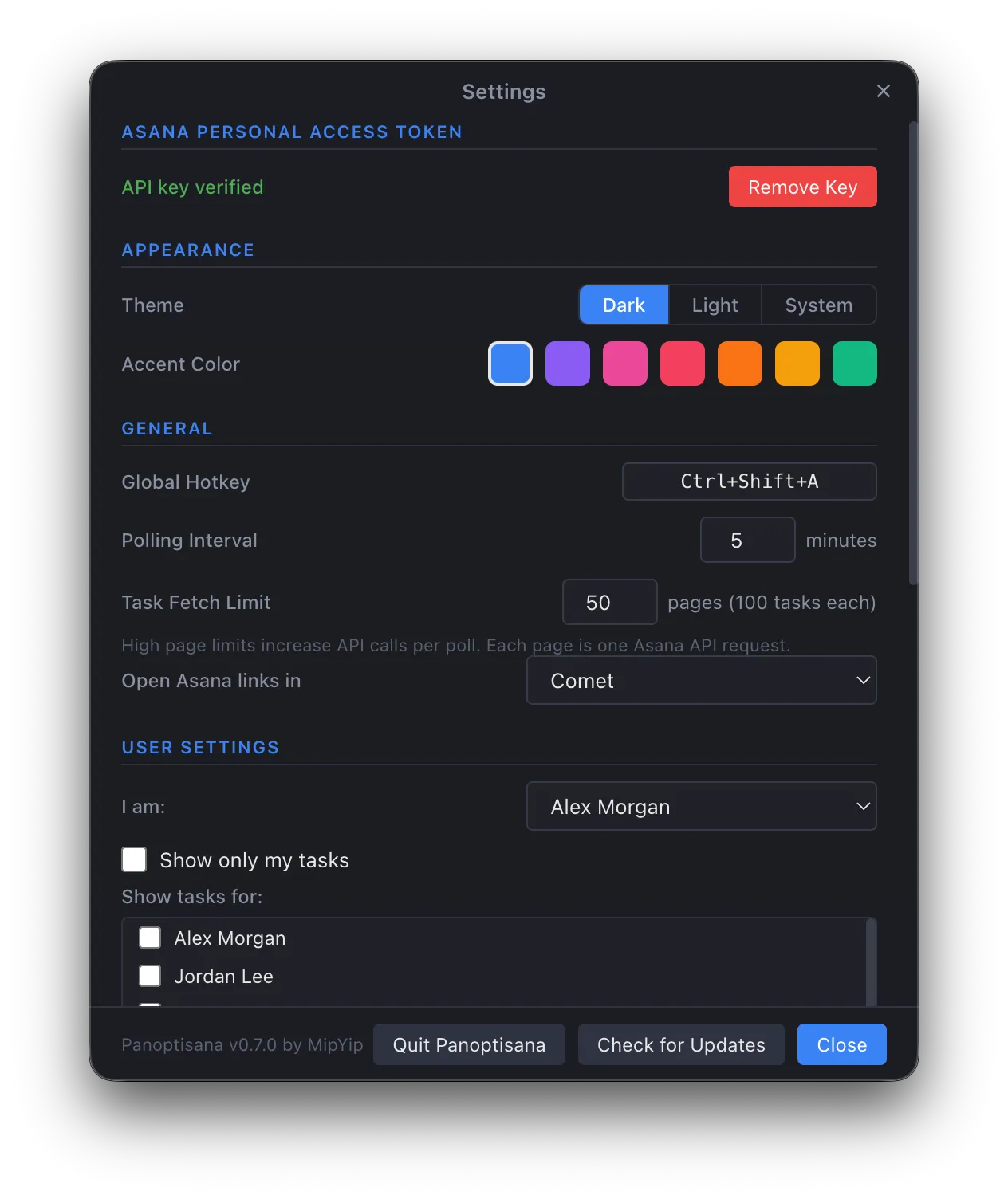
Configurable hotkey, polling, themes — set once and forget
I use this every day. More than Asana itself.
This isn't an app I built and put on a shelf. It's my primary interface to Asana. When I need to check a task, I press Ctrl+Shift+A and it's there. When I need to read comments, post a reply, check a dependency, copy a GID — it's all in the same window. I open the actual Asana web app maybe once a week now, usually for a planning session where I need the board view.
For the other 90% of my Asana interactions — the quick checks, the "what's assigned to me," the "did someone reply to that thing" — Panoptisana handles it without the cognitive overhead of loading a full project management web app.
It works because it shows you less. And for ADHD brains, less is the whole point.
Honest Comparison
Panoptisana vs. just using Asana.
Asana is a good product for what it's designed for. But it's designed for teams in planning mode, not individuals in execution mode.
| Panoptisana | Asana Web App | |
|---|---|---|
| See your tasks | Press hotkey → instant list | Open browser → navigate → wait for load |
| Visual clutter | Tasks only, dark minimal UI | Sidebar, banners, boards, timelines |
| Context switching | Overlay window, no app switch | Full browser tab, full web app |
| Search | Type and list filters instantly | Global search across all of Asana |
| Task detail | Click task → detail panel | Click task → new page load → full UI |
| Copy GIDs/URLs | One click per field | DevTools or URL parsing |
| Browser involvement | None | It is a browser app |
| Cognitive load | Low — shows only your tasks | High — shows everything |
It Still Does Plenty
Focused doesn't mean stripped down.
Everything here serves the same goal: get the information you need with the least friction and the least noise.
Inbox notifications
Slide-out drawer shows new comments, assignments, and changes. Notification dot tells you something's new without demanding your attention.
Comments & @mentions
Read and post comments directly. No browser round-trip to reply to a teammate.
Pinned tasks
Pin the things that actually matter to the top. Persists across sessions.
Dependencies
"Blocked by" and "Blocking" with clickable navigation. See the chain without opening three tabs.
Subtask navigation
Drill into subtasks, navigate back. The detail panel handles the hierarchy.
One-click copy everything
Task names, GIDs, URLs, project names — one click. Built for pasting into Slack, PRs, and docs.
See your Asana without the noise.
Free, open source, no sign-up, no tracking. Download, add your Asana token, and you're running. If it doesn't help, you've lost nothing.
Open source (GPL-3.0) · macOS only · Requires an Asana Personal Access Token