I Used WordPress for 20 Years and I Was Wrong
I started building websites on WordPress around 2005. I was also using Joomla at the same time — which, if you’ve ever used it, explains why WordPress won that particular contest quickly and decisively.
For twenty years, WordPress was the answer. Personal sites, corporate sites, everything in between. It had plugins for anything you could imagine, a theme for every aesthetic, and a community that could solve any problem you ran into. For a long time, it genuinely worked.
Until it didn’t. And it wasn’t all at once, not a dramatic failure. It was more like twenty years of paper cuts that finally bled out.
The Smart Fridge Problem
WordPress carries the weight of everything it can do, whether you need it or not.
The admin dashboard is a full application. Login system, user management, media library, plugin architecture, database abstraction, REST API, cron jobs — all of it running on every page load, for every visitor, whether your site needs any of it or not. For most sites — and I mean the vast majority — none of that matters. Your marketing site doesn’t need a login system. Your blog doesn’t need a database. Your landing page doesn’t need a REST API.
But you’re paying for all of it in server resources, attack surface, and complexity.
Page builders have a tendency to make it worse. Elementor, Divi, WPBakery — they ship every capability they offer to every page, regardless of what you actually use. Need a simple two-column layout? Here’s 400KB of JavaScript that also handles parallax scrolling, animated counters, and particle effects. Just in case.
It’s like buying a refrigerator with a built-in screen that tracks your grocery inventory and auto-orders milk when you’re running low. If you don’t use grocery delivery services — and most people don’t — you just paid an extra $800 for a screen that collects fingerprints and shows a fancy animation when you get water. The fridge still keeps things cold; the cold part was never the problem.
And underneath all of this: PHP. In 2026, the entire ecosystem still runs on PHP. It works, the way a lot of things that are decades old still work. But the gap between what’s possible now and what PHP was originally designed for gets wider every year.
The PageSpeed Insight
I’m obsessive about PageSpeed Insights scores. They’re a proxy for the thing that actually matters — how your site feels to real people on real connections.
My best WordPress score — ever, across twenty years — was a 97. Desktop only.
Getting there required a minimal theme (Twenty Twenty-One), Gutenberg blocks instead of a page builder, three plugins total, hours of manual optimization, server-level OPCache configuration, and Cloudflare caching. One wrong plugin update could knock ten points off overnight, and it still had intermittent issues.
That was the ceiling. On a good day, with everything perfectly tuned (for hours), 97.
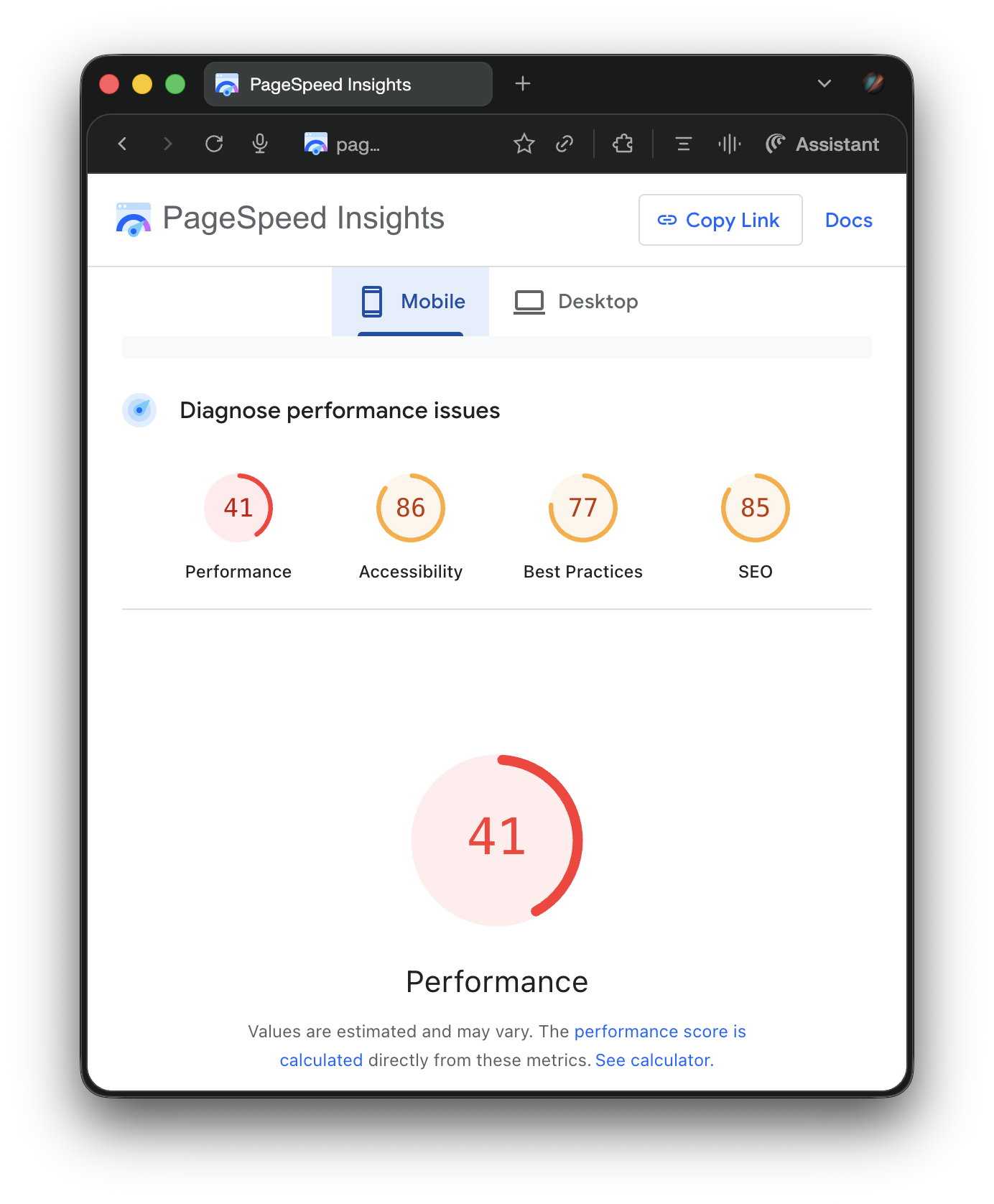
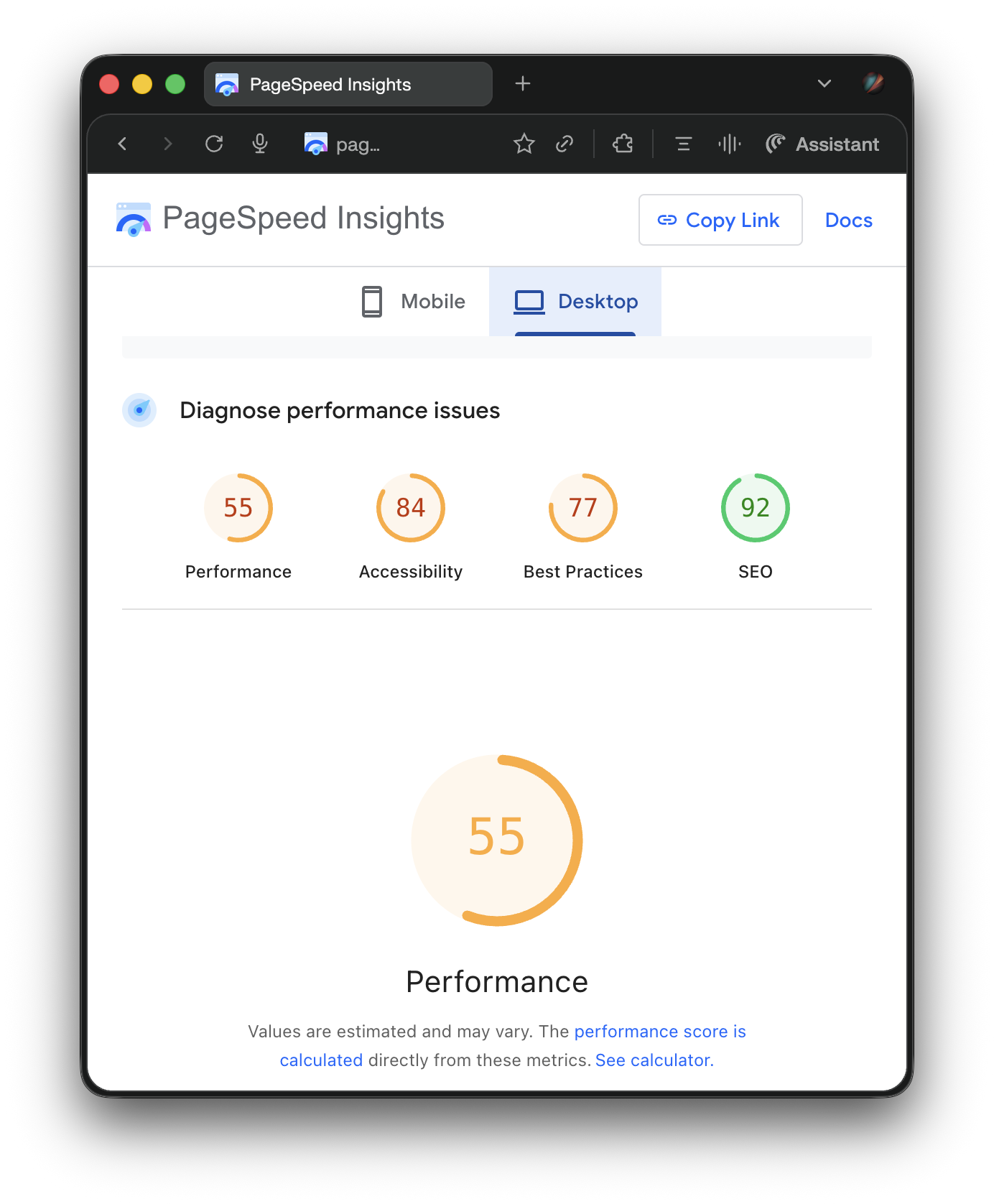
Here’s a WordPress site I know well. It’s hosted on WPEngine — premium managed hosting. It’s had dozens of hours of professional optimization work. It runs a page builder that specifically markets performance as a feature.
Mobile: 41 / 86 / 77 / 85. Desktop: 55 / 84 / 77 / 92.
And here’s this site — the one you’re reading right now.
Mobile: 99 / 95 / 100 / 100. Desktop: 100 / 95 / 100 / 100.
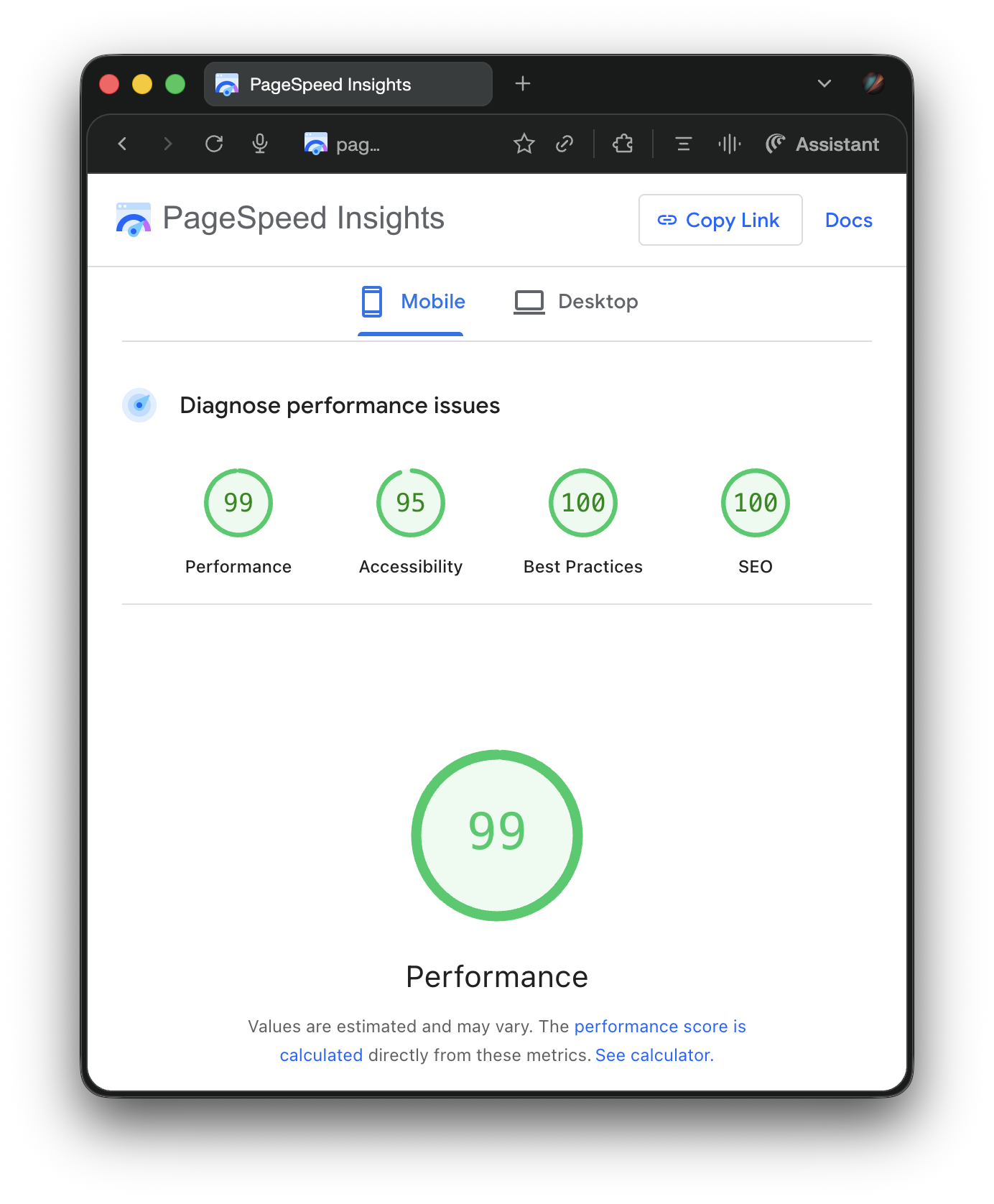
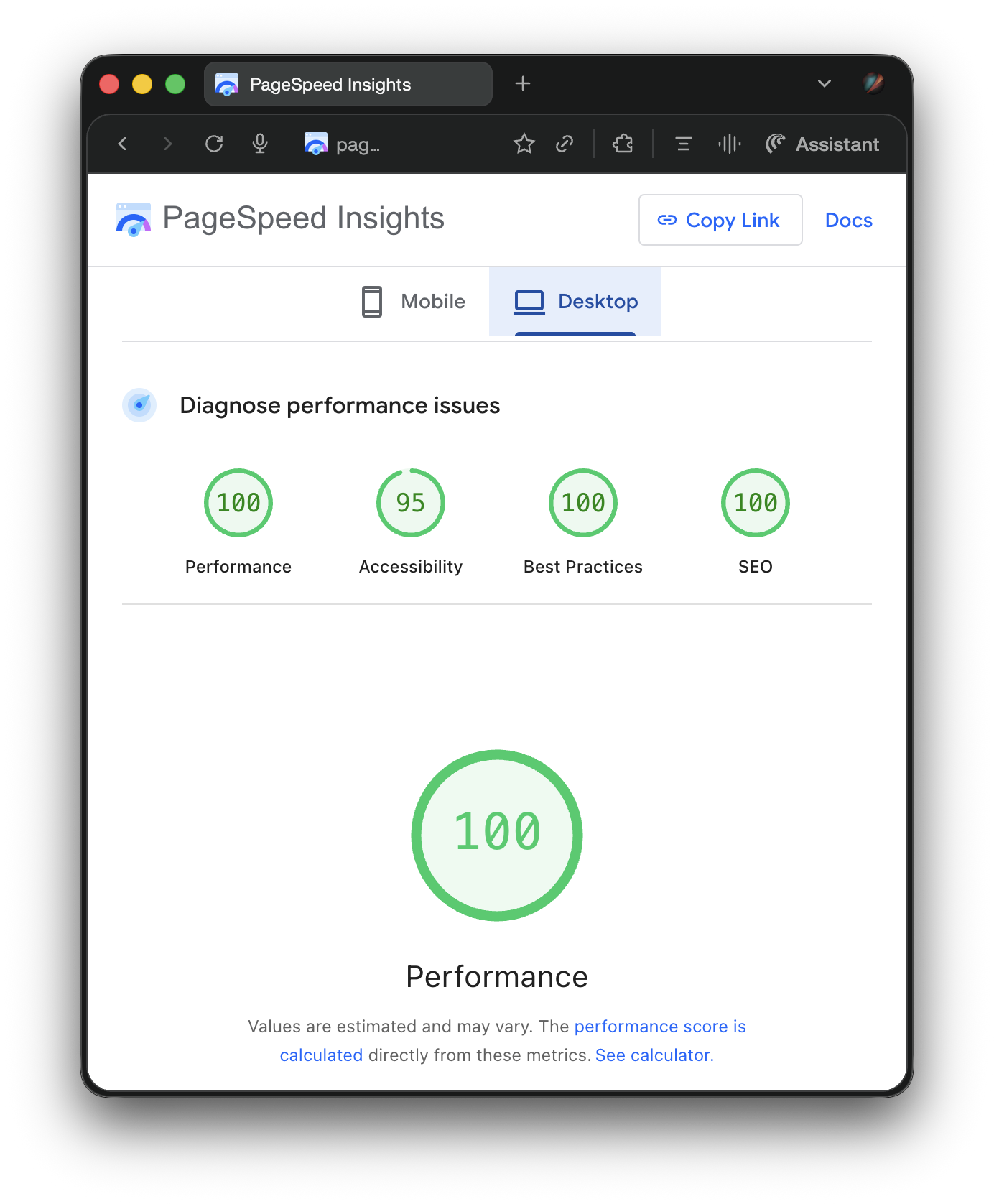
No optimization heroics. No caching plugins. No CDN tricks. Those scores showed up on the first deploy and stayed there. The framework just… ships fast HTML.
Look at those numbers side by side, and you’ll reach the same conclusion I did: This isn’t a tuning problem.
Why Astro
The framework I ultimately switched to is called Astro. It’s a static site generator — meaning it builds your entire site into plain HTML files at build time, and that’s what gets served to visitors. No server, no database, no PHP — just files on a CDN.
Three things made it the right fit:
Zero JavaScript by default. Astro ships no client-side JavaScript unless you explicitly add it. Most marketing sites don’t need JavaScript at all — they’re documents, not applications. Astro treats them that way.
Markdown as a first-class content format. Every blog post on this site is a Markdown file — plain text with lightweight formatting. I opted to use Astro’s component system for the other pages, but I didn’t have to. The entire site could be Markdown if I wanted it to be. No visual editor needed, no database, no lock-in. If you’ve ever written a README on GitHub, you’ve written Markdown.
Framework-agnostic. Astro doesn’t force you into React, Vue, or any other JavaScript framework. You can use them if you want. You can also use none of them. For a marketing site that’s mostly content, “none” is the right answer.
That last point is what delivers the PageSpeed scores. No framework overhead means no framework tax on every page load.
Markdown Is How I Already Think
I’d been writing in Markdown for years before I built this site. Outline, Notion, Obsidian — every notes tool I’ve used in the last decade speaks Markdown natively. My project documentation is Markdown. My random notes are Markdown. The styling shortcuts are second nature at this point — I see the content formatted when I see the symbols. I don’t need a visual preview to know what a ## header or a **bold phrase** looks like rendered.
Markdown files are absurdly portable. Plain text that any parser can consume, any system can render, any tool can index. They load instantly. They version-control perfectly. They’ll be readable in fifty years because they’re just text.
The content format was never the problem. The tooling around it was the problem. Before AI, maintaining a site built from Markdown files meant manually writing templates, building components, managing routing, handling image optimization — the kind of tedious infrastructure work that made WordPress’s “just install a plugin” approach genuinely appealing.
The AI Multiplier
I work with a Claude Code agent that has full context on this site’s codebase — the architecture, the design standards, the content strategy, the voice. We work in the source files simultaneously.
This blog post is a good example of what that workflow looks like:
I had a seven-word idea: “blog post about why I love Astro.” The agent created the notes file. Then it interviewed me — one question at a time, conversational, pulling out details I wouldn’t have thought to include in an outline. It compiled the raw interview into structured notes. I reviewed, added context, corrected emphasis. It drafted. I edited. We polished the final version side by side in SideMark — a Markdown editor I built specifically for this kind of collaborative workflow.
The whole pipeline — from idea to draft with images — takes a fraction of what it used to. The bottleneck is my thinking speed, not my typing speed.
None of that workflow is possible with WordPress. You can’t point an AI agent at a WordPress database and say “work with me on this post.” But you can point it at a folder of Markdown files with a clear architecture document and watch it understand the entire system in seconds. Add a local semantic memory layer like pmem and the agent can recall decisions, patterns, and context from months of previous sessions — no re-explaining needed.
The combination — Markdown content, static site generator, AI-assisted development — turns “I should update my website” from a weekend project into a Tuesday morning. Some posts on this site went from idea to published — with images and scheduled LinkedIn posts — in under twenty minutes. And they’re still my words, my thinking. The combination of Astro and AI just removed the friction between having something to say and saying it.
”But My Ecommerce Is on WordPress”
I can already hear it. “My store runs on WooCommerce. I can’t separate my marketing site from my ecommerce.”
You can, and you should.
Your marketing pages and your ecommerce platform have fundamentally different performance requirements. Marketing pages need to be fast — fast enough that Google ranks them, fast enough that visitors don’t bounce, fast enough that your PageSpeed scores aren’t embarrassing when a potential client checks. Ecommerce pages need to be functional — cart logic, payment processing, inventory management, user accounts.
Bundling them together means your marketing pages carry the weight of your ecommerce platform on every load. Your beautiful landing page is slower because it’s sharing infrastructure with your checkout flow.
Keep your ecommerce where it works — WooCommerce, Shopify, whatever you’ve built. Put it on a subdirectory. Build your marketing site as a separate, blazing-fast static site, and surface product data, cart state, and key behaviors to the marketing side through JavaScript and session management. To the visitor, it looks seamless. Under the hood, each part is optimized for what it actually needs to do.
Separation of concerns — it’s an engineering principle that applies to site architecture just as well as it applies to application code.
Twenty Years Is a Long Time to Be Wrong
WordPress powers a huge portion of the web and it does what it does. I’m not here to bury it (and I wouldn’t want to if I could). But after twenty years of paper cuts, accumulated complexity, and a performance ceiling that required heroic effort to approach — I had to ask myself whether I was still using it because it was the right tool, or because it was the familiar one.
The willingness to evaluate your tools honestly — even the ones you’ve invested decades in — is the difference between building systems that serve you and serving systems you’ve already built.
Not sure whether your WordPress setup is costing you more than it should? The WordPress diagnostic runs a live audit of your site’s performance, security, and technical health in about two minutes.
Or get new posts in your inbox
Occasional writing on systems, ADHD, and AI. No cadence pressure.
You're in. I'll send you the next one.